Showing posts with label Navigation. Show all posts

Tuesday, 27 June 2023

Things We Learnt

  "Things We Learnt" and I hope to add to them as we go along, they are in no particular order.

Things break.

Is it wise to have things that serve a dual purpose, if it breaks then you loose two or more systems

Spare parts, stock up wisely the best thing to do prior to a voyage is to ask around, see if you can get an idea on what your type of vessel has had fail. Every one will have a tale to tell and what was important to them. 

Invert cans of antifoul, his sounds like a good idea however all the heavy metal still falls to the bottom of the can once stood the right way up. I think the real message should be, stir cans of antifoul vigorously before use, and then again and again before decanting into roller trays or spray equipment.

Clear flush the water tank fill hose prior to topping up the tanks. Pre taste and inspect water before filling tanks, use a charcoal pre filter

Check the operation of a gas detector by holding an unlit lighter under the sensor and pressing the lighter’s valve.

Citrus hand cleaner with pumice grit, (fast orange etc) to clean power cords tenders and fenders

While electronic navigation plays a central role on most boats today, paper charts should have their place at the sensible sailor’s navigation station. No Chart Plotter can match the “ overall picture” offered by paper charts, or the backup benefit in an electronics failure no matter how it was caused. 

Chart Plotters, dont become a satellite aided grounding statistic.  If you only have one chartplotter, keep it zoomed in. You really want to see the detail, there has been the loss of several vessels due to the chart plotter being zoomed out to see the destination miles away. Zooming out to this scale removes important details like reefs and rocks.

 Saving night vision: We have red floor lights in the cabin and throughout the vessel; these do help to keep night vision when we need to go below or before coming on shift. Once we have worked out our passage plan and entered all the problems and marked all the clearing bearings on the paper charts and into the chart plotter we make sure we don’t mark any areas of interest with pink or red lines, we want to make sure they are visible under red light. Another trick I have learnt is instead of only using the night dimming function of the chart plotter I have a square of red acrylic that I can Velcro to the face of the chart plotter. We have found that we can still see the detail of the chart and save our night vision at the same time. If your instruments are too bright, squares of red acrylic can be cut to fit the face of your instrumentation.  

The previous owner decided to take the brand plaque from the steering compass flip it over and have it engraved with the vessels name. While this looked pretty he screwed it back on to the compass housing using plated steel screws. It wasn’t long after taking possession of the vessel, I was getting concerned with the steering compass performance and was about to head out to do some checks. Then as I was getting a closer look at the compass and had removed the outer cover I noticed rust bubbles on the chrome screws. The compass took off and changed about ten degrees when I removed the screws and it hasn’t worked better. So it is well worth your while when doing work around the compass to check the compass reading prior to starting work then again after, while this isn’t a definitive test at least you will have some idea that what you have done has either changed the magnetic field of your vessel or not and it will need to be sorted out before heading too far afield. It is always a good idea to swing the compass after any work, or after being tied up at the dock for some time.

Wind generators and exploding blades, it does happen. Our last set of blades lasted 9 years of use through all sorts of weather without mishap. With a little human intervention you can minimize the risk of the blades letting go. To keep the wind generator from going into free wheel and over revving keep a load on the generator. If you are in strong winds and the batteries are getting close to fully charged it’s time to put the brakes on for a while. I did some investigation and found when the battery levels are low and can take all the wind generator can output, the generator doesn’t easily get to the high speed spin. I found that when the generator is loaded it will walk on the blades, similar to prop walk and will slow before starting again, the process continues time and time again until the batteries start to become fully charged. The load reduces when the batteries are reaching the fully charged state and the prop walk doesn’t happen as much, and without load before you know it the generator is going into over speed even though it’s not supposed to due to inbuilt electronic braking. Other things you can do to reduce the risk? If a storm or high winds are headed your way turn the brakes on or tie the generator off so it won’t run. Don’t run you wind generator when tied up at the dock and you are charging the batteries with shore power at the same time, Its bloody annoying for your neighbors and even the quite generators can get on your nerves after a while, secondly your batteries will be topped up and not load the generator.  

 Pickling the water maker, if you need to have your water maker pickled when you are not going to be using it for a while make sure you use the chemicals supplied by the manufacturer. We had an expensive rebuild on our pump when we sent it for a service, it looks like our water maker had previously been pickled with the wrong solution not the manufactures recommended product. The problem here is that the use of incorrect chemicals can damage the plastics commonly used in systems. So in our case instead of a rebuild we required a complete new pump at 3 times the price. By paying slightly more for the pickling solution from the manufacture can mean a better total cost of ownership. The next best bit of advice I can say about a water maker is to flush it with fresh water when you have finished, they are like any other piece of equipment, wash the salt off or out from inside will prolong their life. And what ever you do if you have a Spectra system never use sodium metabisulphite to pickle it, there those who have no idea and will recommend it because that's what they use in their brand of watermaker. Do not follow their advice or you will ruin the plastics in the system.  

We have experienced times when ships ( large <900’ ships) are anything up to a mile ahead of the plotted AIS position, the position isn’t static but moving at the same speed as the vessel being recorded by radar. Beware of relying on AIS positions as being 100% accurate, while I am sure we have seen them advertised as radar, these units are not radar. When working well and all the local traffic is transmitting trouble free they do seem able to place vessels on the display very close to their actual position. Unfortunately there is room for error due to a multitude of reasons, everything from propagation delays, outside interference, transmitter equipment faults, receiver errors, and the list goes on and I won’t go into these here as it’s not in the scope of the article. Only ships of 300 gross tonnage and upwards are required to have it and often it is the fishing boats and smaller vessels that are a bigger risk near the coast due to the sheer number of them. So radar is still the best at seeing what is around you. If you want radar buy radar, if you want a tool for gaining information of ships in and around your area of operation then get AIS as well. We use it a lot as another tool to make it safer out on the water, gives us a ship name to call by radio. But just don’t rely upon it for safely finding all targets and placing them on the plotter where they really are.

 Wire crimps need to be put on correctly to be of any use

Same goes for swaged rigging fittings, they need to be put on correctly so they dont break loose.

Something we learnt early on is to read sealant tube instructions and especially check the list of non acid sealant contents or look at the cleanup on the back. Acid based silicone can be a problem if used on metal.

We have found the product CLR has a multitude of uses on board. I use it to remove rust stains from gel coat and painted surfaces. Removing calcium from around fresh water fittings. 

If you like to spray a boat wash which has phosphoric acid as an ingredient be aware that some sealants for bedding deck fittings can become either soft or actually start to crumble if left exposed to the acid for some time.  

 To help keep crew on and have a good handle when moving along the deck we have replaced the top wire of the lifelines with stainless steel tube, this makes for a better hand hold and is better to fall against in a sea way. It’s not for everyone but it is an option that has worked well for us.  


Monday, 27 February 2023

Drawbacks of Using Satellite Imagery

 A valuable tool

Undoubtedly satellite images are a fantastic useful tool for cruisers seeking greater accuracy in navigation. For us, satellite imagery increases the precision when we passage plan and allows us to explore remote areas, which we have found is usually most places out of the major shipping lanes and ports. We are able to find secure anchorages off the beaten track and ultimately this augmented navigation presents safer cruising. Now after using these satellite images/satellite photo charts it would be hard to think of navigating to new destinations without it. Practice makes perfect, and better forward planning and safer route selection does have its rewards as we enjoy safer navigation on our sailing adventures.

1. Missing data

With most satellite data providers all the major landmasses and their coasts are well covered, however some are covered better than others. There are still small islands, shallow reefs and dangerous rocks that are yet to be covered or should that be uncovered in remote areas. Sea areas without satellite imagery are coloured a hazy blue, AKA the Google Cloak, this can be seen on all the Google Earth satellite photo ocean areas. This has the potential to be misleading, do not assume this hazy blue area is safe, deep water. Even if your charts were made based on an old datum, look over your charts (paper or electronic) for guidance, there may be small islands, reefs or obstacles that have not yet been detailed in the satellite photos. Some of the time small reefs or even islands can be seen on the satellite photo cloaked area as an indentation, and requires investigation. Given time, we hope more and more of these areas are covered, and the cloak can be removed. While this sounds great remember the product name is Earth and not Sea so submerged reefs in some areas will more than likely never be shown.


The Cloak covering two small islands, the area selected here was to demonstrate the cloak and sometimes there are no clearance holes. Here the official chart of the area must have shown islands, and their charted location was uncloaked, however their position on the official chart would not be correct on a WGS84 datum chart hence the uncloaking missing the islands real position.  

Another satellite image provider showing the islands un-cloaked, all providers have cloaked areas. It is worthwhile to check satellite photo providers to see if there are areas uncloaked that you will be travelling in. 

2. Image Clarity

This has to be one of the biggest issues when trying to either passage plan or make charts. Google Earth well for that matter most satellite photo providers focus is providing satellite imagery for populated regions and areas of interest, the number of updates made to the images is based on this criteria. Blurred or cloud covered images do appear and are not uncommon in the more remote areas especially in SE Asia, sadly this makes them little or no use for navigation. One way we try and overcome this is to use Google Earth, they retain historical images and by using a time selection slide bar you can view older images, these may provide better clarity. Another way is to use other suppliers, Bing can some times fill in the blanks. We use SASplanet and can select satellite photos from several different sources. That said there are still times when we just cannot find a clear shot.

Island shown, this satellite photo provider had clear images even zoomed in to show the coast details.

Same Island from another provider, even zooming in did not improve the detail needed to make use it useful for navigation.

Same island again, the images spliced together however the photos one side of the island were very blurry or lacked detail.

All zoom levels of this remote island were obscured by cloud cover  

Different sat photo provider showing the detail of the same island good even at low zoom levels. It certainly pays off to compare providers. 

3. Cached Data Size Limit

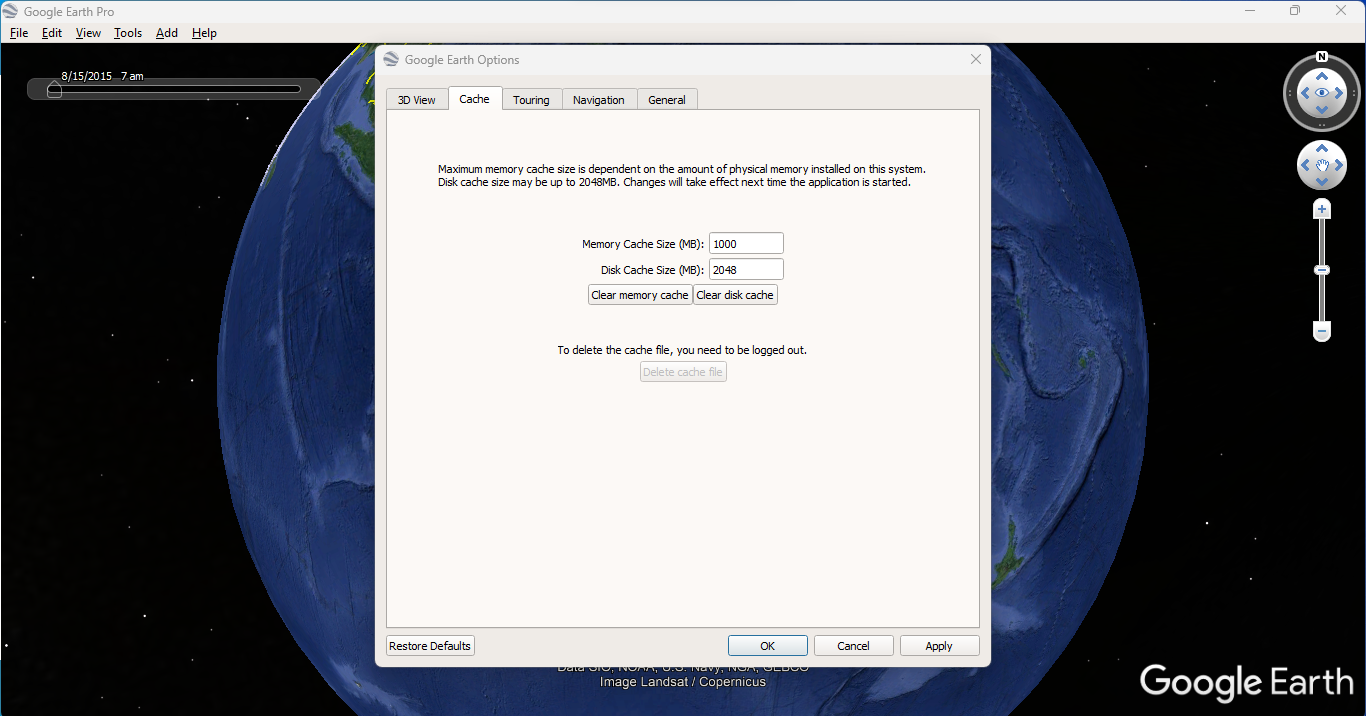
One limitation imposed by the Google Earth program is a 2GB cache limit, which means it will fill your disk with up to 2GB of satellite imagery for use when your offline. Once you fill the 2GB space it will then delete the oldest or least used information to make space for the new images. If you intend to travel into a remote area and have filled the Cache with data you intend to use. At all costs keep your PC offline, turn off the WiFi, this way there will not be new data to overwrite the data in the cache. Its for this reason we also make satellite photo charts when we are passage planning before travelling. SASplanet also allows for cached data, and we like to also plan out the passage as well should some thing happen to Google Earth. With out doubt one function we do make good use of with OpenCPN is the function to display google earth along side of the chart. We get the depth data from the chart and the good visual from the satellite photo real time. The only draw back to using Google Earth for this is you require an older version of Google Earth to allow it to be displayed in OpenCPN.

OpenCPN running the Google Earth plugin, the satellite photo to the left and we were able to check depth on the chart on the right. In this remote location we were running Google Earth from cache. 

Google Earth cache selection page, you can try and change the cache size but it appears even though it allows different numbers to be entered it doesn't actually change the storage size past 2Gb

4. Location accuracy

While Google Earth uses WGS84 datum for referencing, errors can occur. We have heard of one cruiser who went to go through a passage in a reef in Wakatobi and when lining it up,  he noticed it wasn't as on the satellite chart. After they were on the pick and back on line they started to compare their track to different satellite photo providers and found that the Google Earth satellite image was the only one out. (the channel in question did under go widening in 2016) Googles explanation was satellite images are a composite of multiple distinct frames which are then digitally combined and errors do occur. So we all need to be aware of this potential issue, and depending on the image's age things can change, channels re cut, bridges or jetties built or even whole islands can be reclaimed. During passage planning we lay our route on different satellite images as a secondary check. This is where SASplanet comes into its own we can check other satellite photo providers quickly and easily.


The track shows that we went in over the reef, lined it up and off we went. As it was a clear day with the sun over head I know we were near mid passage. While this could be blamed on the satellite charts, it could easily be a combination of errors including some GPS error. 

5. Depth and other data

Good quality satellite imagery can provide augmented accuracy out on the water. The limitations start with not having soundings, or navigation aids found on marine charts. However used in conjunction with marine charts these satellite image charts aid navigation and can show underwater obstacles totally missed by previous hydrographic surveys if there was one. While I have said the nav aids are missing from the satellite photos, if you can obtain clear satellite photos, zooming in can some times reveal the location of beacons, buoys, and lighthouses. We have done this on several occasions, if the buoy or beacon is on the chart we zoom in to see if its possible to get a visual on the satellite photo. Or we make a satellite image chart and can switch between the two using OpenCPN.


With a good clear satellite photo its possible to check the beacon and navigation aid locations 

The nav aid positions on both the chart and satellite chart can provide augmented accuracy.


A RADAR overlay on the chart plotter can certainly help you confirm your position and can provide augmented accuracy. Where charting can be inaccurate, a RADAR overlay helps you confirm your position, based on plans made using satellite imagery, is right.

While I haven't shown a RADAR overlay, with a chart this far out it would very quickly show things are not positioned as they should have been.

The same coast line as above but the vessels are displayed on the satellite chart. 

When closing land we pay particular attention to the RADAR overlaid on electronic charts, to confirm our position and to see if the chart matches what is really out there. We have experienced several instances where the chart is out. It can be unnerving when your chart shows your route is about to take you over a headland on the chart and we can breath a sigh of relief when radar and satellite charts confirms you are not. That user created satellite image chart or downloaded cache file was worthwhile.

We set depth alarms to warn us when the depth starts to shoal, we also set up alerts on the GPS to warn of upcoming hazards. It doesn’t take much to put in a waypoint and set up alarm guard radius to let you know your in the area of a hazard. At every watch change the person coming on watch checks the chart and zooms in on the route to ensure no surprises await. As often as we can we find its always best to zoom in the chart plotter every twenty minutes, the number of times we have heard people say we ran into an uncharted ‘whatever’ when in reality it was charted but not at the zoom level they were using. However that's not always the case but always try and zoom in on the satellite charts when passage planning does certainly help.

As we near our destination we will look over the satellite images on the laptop to familiarise ourselves with our destination. Keep in mind no tool is totally incontestable, even RADAR can miss things or not provide a clear picture, its only as good as its reflected target and we have seen some nasty targets that don't reflect a thing. At the end of the day, a look out  (wearing good quality polaroid glasses) is still used more often than any other tool we have on board.

Navigating in the Digital Age a post on some of the tools we use aboard Matilda. 

One mans datum is another mans ship wreck a quick discussion about chart datum


Sunday, 26 February 2023

Dangers With LED Lighting

 LED lighting found to interfere with VHF-FM radio and AIS reception

There is potential for LED (light-emitting diode) lighting on vessels to compromise reception on VHF frequencies.

Keep in mind the problems are more than likely not with the LEDs but the power supplies that run the lights. Some LED lights have power supplies externally or built in to the bulbs. While this is off the target similar problems can also be encountered with USB 3 equipment running on a laptop, navigation equipment including GPS reception can be affected and can be tested in a similar manner.

The United States Coast Guard has sounded the alarm over the potential for LED lighting on vessels to compromise reception on VHF frequencies used for radiotelephone, Digital Selective Calling (DSC) and Automatic Identification System (AIS).

The distance at which the LED lighting starts to have an impact and whether the issue is limited to certain makes of lighting or navigation equipment. The United States Coast Guard has asked the United States marine industry to provide more detail of known incidents.

Due to their energy-saving capability and longer service life, LED lights are commonly used for navigation lighting, searchlights and floodlights, as well as interior and exterior lighting—including those used for visual effect.

The United States Coast Guard said that in one case, radio-frequency interference caused by LED lighting created a hazard that led to a serious safety incident.

‘The maritime rescue coordination centre in a United States port was unable to contact a ship by VHF radio that was involved in a traffic separation scheme incident. That ship also experienced very poor AIS reception. Other ships have also experienced degradation of their VHF receivers (including AIS), caused by their LED navigation lights. LED lighting installed near VHF antennas has also been found to reduce reception.’

Strong radio interference from LED sources may not be immediately apparent to marine radio users, but there is a way to test for LED interference (see below).

If you have experienced LED-lighting interference on your vessel please report it to your local marine authority, in Australia its AMSA.


How to test for LED interference.

  1. Turn off your LED light.

  2. Tune your VHF radio to a quiet channel, such as Channel 73.

  3. Adjust your VHF radio’s squelch control until the radio outputs audio noise.

  4. Re-adjust the squelch control until the audio noise is quiet—just slightly above the noise threshold.

  5. Turn your LED light back on.

  6. If the radio starts crackling when you turn on the LED lights, it is likely that the LED lights are affecting both your shipboard VHF marine radio and AIS reception.

Thursday, 2 February 2023

Global Navigation Satellite System and Satellite Based Augmentation Systems

 GNSS GPS and SBAS So what do these acronyms stand for?  

Handy to know if your headed out to buy a new satellite navigation system. 

GNSS stands for Global Navigation Satellite System, and is an overarching term that encompasses all of the global satellite positioning systems. This includes constellations of satellites orbiting over the earth’s surface continuously transmitting signals that enable users to determine their position. These satellite constellations are owned and controlled by the governments of different countries. Due to design and operation, the signals and frequency's from the different systems are individual. Purchasing a system that is purported to be capable of processing the signals from a variety of systems must be backed up with an antenna capable of receiving the signals different frequencies. Keep in mind there are few receivers capable of using more than two constellations at the one time.  In a lot of cases the constellations can be selected using the receivers software, however as I have noted your unit must be connected to antenna capable of receiving the signals.  

Constellations of satellites orbiting over the earth’s surface continuously transmitting signals that enable users to determine their position. At a minimum, four satellites must be in view of the receiver for it to compute four unknown quantities (three position coordinates and clock deviation from satellite time), this is also why more satellites equal more precision.

GPS  Global Positioning System is but one component of GNSS (the Global Navigation Satellite System). GPS specifically refers to the NAVSTAR Global Positioning System, a constellation of satellites developed by the United States Department of Defence. Originally GPS was developed for military use, but was later made accessible to civilians and industry. GPS is now the most widely used component of GNSS in the world, and provides continuous positioning and timing information globally even under the most arduous weather conditions. This is the system that started the satellite positioning revolution. The term GPS does get used a lot to explain satellite navigation, like the term iPad is used to describe a tablet computer. 

In addition to GPS, other systems are in use or under development. These systems make up the other orbiting constellations of satellites. Several governments are developing or have operational their own systems due to the fact the US government can selectively deny access to the GPS system or degrade the system performance at any time. This has happened in the past and it is possible it could happen again in the future. 

GLONASS the Russian Global Navigation Satellite System (GLONASS) was developed at the same time as GPS, but suffered from incomplete coverage of the globe until recent years.  GLONASS signals can be added to GNSS devices, making more satellites available and enabling positions to be fixed more quickly and accurately, sometimes to within two meters. 

Galileo is Europe’s Satellite Navigation System constellation, providing improved positioning and timing information with a significant positive impact for many European services and users. Until now, GNSS users have had to depend on American non-civilian GPS or Russian GLONASS signals. With Galileo, users now have a, reliable alternative that, unlike these other programs, remains under civilian control.

BDS is China's BeiDou Navigation Satellite System. In 2015, China started the latest generation BeiDou system for a global coverage constellation. The first satellite of the latest generation was launched in March 2015. As of October 2018, fifteen BDS satellites had been launched. The constellation will eventually consist of 35 satellites and is expected to provide global services upon completion in 2020. When fully completed, BeiDou will provide an alternative global navigation satellite system to the United States owned Global Positioning System the Russian GLONASS or European Galileo systems and is expected to be more accurate than these.

NAVIC The Indian Regional Navigation Satellite System (IRNSS), with an operational name of NAVIC. NAVIC is an independent regional satellite navigation system that provides accurate real-time positioning and timing services. It covers India and a region extending 1,500 km around it, with plans for further extension. The system currently consists of a constellation of seven satellites. NAVIC will provide two levels of service, the "standard positioning service", which will be open for civilian use, and a "restricted service" (an encrypted one) for authorised users (including the military). NAVIC is planned to become available for civilian use in the first half of 2020. There are plans to expand the NAVIC system by increasing its constellation size from 7 to 11.

To sum up the main satellite constellations are GPS (USA), GLONASS (Russia), Galileo (EU), BeiDou (China) NAVIC (India). These five satellite systems are the major players under the umbrella term GNSS.  So a global navigation satellite system (GNSS) is a group of synchronized satellite constellations working collectively transmitting radio signals used for position navigation and time solutions. The position navigation and time solutions provided by these GNSS are used for a wide and growing variety of applications covering most industry sectors including agriculture, aviation, construction, consumer, resources, road, rail, maritime, mining and water utilities. Time solutions for the synchronisation of communication including cell phones, and electrical networks to name a few.  

Fundamentals

The GNSS concept is based on time and the known position of GNSS satellites. The satellites carry very stable atomic clocks that are synchronized with one another and with the ground station clocks. Any drift from true time maintained on the ground is corrected daily. In the same manner, the satellite locations are known with great precision. GNSS receivers have clocks, but they are less stable and less precise.

At a glance its easy to see the benefits of having a number of available sources of data. However that said most receivers use GPS as the primary source of positioning, so that has to be saying some thing about the robustness of the system as a whole. 

GNSS Receivers

GNSS satellites continuously transmit data about their current time and position. A GNSS receiver monitors multiple satellites and solves equations to determine the precise position of the receiver and its deviation from true time. How many satellites a receiver can track or monitor, I have seen up to 99 listed however this varies with brand. Another technique becoming common is to deliver position aiding data to the GNSS receiver via wireless networks or the Internet. Supplying information such as ephemeris, almanac, approximate last position, time and satellite status and an optional time synchronisation signal significantly reduces Time to First Fix (TTFF) and improves acquisition sensitivity.

At a minimum, four satellites must be in view of the receiver for it to compute four unknown quantities (three position coordinates and clock deviation from satellite time), this is also why more satellites equal more precision. The information provided by a generic GNSS receiver can be used by a wide range of applications. Most systems use the receiver's solution, the receivers computed position, velocity and time to run the task assigned.

Keep in mind most GNSS receivers can pick up GPS signals (if configured), however a GPS receiver can not pick up signals from the other constellations of orbiting satellites. This can be a hard to comprehend due to the way most systems are loosely referred to as GPS, I have even seen systems that use triangulation of phone towers to find a positioning solution called GPS.  

If one system is down, most of the newer GNSS receivers will already be using signals from all the other systems. Just look for the number of satellites your receiver will track, fifty six is common but more is now the norm.   And of course, the more satellites your receiver is looking at and acquiring data from the more likely that if your line of sight to one satellite is obstructed by a mast, boom, Bimini frame or other obstacle, it can receive signals from another satellite.

GNSS Accuracy

In open sky conditions, standard accuracy GNSS receivers are accurate to around two meters, however, because GNSS receivers rely on the time it takes a satellite signal to reach them, even the slightest errors like a millionth of a second can impact accuracy. 

Errors in satellite orbit position can lead to around 2.5 meters loss of accuracy. Satellite clock errors can add another 1.5 meters. Atmospheric disturbances can add another five meters, plus throw in the occasional intense burst of solar activity or multi path effects like signals bouncing off the sea surface, mast, boom or spray dodger frames, and this accuracy can easily bump the error out to 10 meters or more. 

GNSS systems in Australia

Australia is one of few countries in the world with high visibility to six GNSS due to our geographical location. These include not only the main global systems of GPS, GLONASS, Galileo, BeiDou, NAVIC but also Japan's Quasi Zenith Satellite System (QZSS).

RTK 

A simple RTK system the rover can be backpack or vehicle mounted

Real-time kinematic (RTK) positioning technique is used to enhance the precision of positioning data received from global navigation satellite systems such as GPS, GLONASS, Galileo, NAVIC and BeiDou. Luckily, high precision GNSS systems dramatically improve precision using GNSS correction data to cancel out the errors. One way to do this involves monitoring GNSS signals at a base station set up on a known location (surveyed). Deviations from the base station’s position are observed and sent via radio link to the mobile vehicle (AKA rover). The rover is equipped with a GNSS receiver and radio link receiver for the deviation corrections. When the deviation corrections are received at the rover they are applied in real time to the GNSS position to obtain a more accurate position reading. In favourable conditions, this approach can be used to achieve centimetre level accuracy, provided that the base station and the rover are not too far apart. Real-time kinematic (RTK) positioning technique is widely used by the geospatial industry for increased accuracy in surveying and mapping (navigation).


Welcome to the wonderful world of Satellite Based Augmentation Systems 

This coverage map may mean more after reading the description below. 


SBAS

We hear the term *augmentation system or SBAS thrown around a lot these day so what does SBAS stand for?

SBAS stands for satellite-based augmentation system. A Satellite Based Augmentation System is a wide area differential Global Navigation Satellite System (DGNSS) signal augmentation system which uses a number of geostationary satellites, able to cover vast regional areas. These geostationary satellites don’t move, in other words they stay in sync with the rotation of the earth as opposed to the GNSS satellites that orbit the earth continuously.

To calculate GNSS position errors, GNSS data received from satellites is compared against the precise location of each land based ground station. Discrepancies are measured and the corrections, called deviation corrections, are transmitted to the geostationary satellites.  These satellites then broadcast primary GNSS data which has been provided with the received integrity, ranging, and deviation correction information sent from the regional SBAS ground stations. 

While the primary purpose of SBAS is to provide integrity assurance, use of the system also increases accuracy and can reduce positional errors to less than 1 meter.

So in a nut shell SBAS is a regional network of ground stations and satellites that work together to boost the accuracy and dependability GNSS data. The increased accuracy is critical for aviation and is another technique widely used by the geospatial industry for increased accuracy in navigation and mapping.

Here is a drawing of a basic SBAS set up. On the left bottom is a number of receivers collecting positioning data from the orbiting satellites. The signals are then passed to the central processing unit that calculates what corrections are required for what satellite. That information is then available via the internet or it is transmitted to one of the GeoStationary satellites. The GeoStationary satellites then transmits these corrections to our mobile (ship car airplane) GNSS receiver to correct our position making for very a accurate location (lets hope the map is as accurate to make it of use) . 


While all this sounds great, how do we benefit. The GNSS receiver you purchase will hopefully be able to use the correction data that has been sent to it from the regional geostationary satellites. Your GNSS receiver may then display that you are navigating with DGNSS.  I think most of us have heard of WAAS and how it will transform our GPS in to a super accurate navigation device. Well WAAS can do wonderful things,  however for those of us who live in Australia or sail around the Pacific  it won’t help give us any better positioning accuracy. 

Now the bad news, while we here in Australia are lucky enough have high visibility of up to six GNSS constellations due to our geographical location. We do not have the use of a Satellite Based Augmentation System at present. The tests have been done and hopefully it will become fully operational in the near future.  If the documentation I have researched is correct our corrections will be broadcast by Japan's Quasi Zenith Satellite System (QZSS). I have seen this pop up on my GNSS from time to time and my receiver does indeed switch to DGNSS. 

So if the sales man trying to sell you a GNSS receiver starts letting you know about the added accuracy of the various systems like WAAS, EGNOS, MSAS and GAGAN.  You have the heads up that none are any good to you unless your headed off around the world, and really you don’t want to be paying extra for systems you will never need or use. Its nice to know those in other parts of the world can enjoy dynamic positioning however in Australia its getting there.  SBAS is regional and the regions and systems are listed below.  

Now for some good news.  The Australia test (not cricket) transmission has been extended and will be available until 31 July 2020. This will provide continuity of SBAS signals to support R&D, industry testing and encourage early adoption. Ya gota hope so. 

*Augmentation the process of increasing the size, value, or quality of something by adding to it.
*To augment is to increase the amount or strength of something 

Regions that have SBAS coverage, for a better visual look at the coverage map at the begining of this section

WAAS United States, Canada, and Mexico,  Wide Area Augmentation System, or WAAS, is operated by the United States Federal Aviation Administration. Development for WAAS began in 1994.

EGNOS European Union: European Geostationary Navigation Overlay Service, or EGNOS, was developed by the European Space Agency.

MSAS Japan: The Multi-Functional Satellite Augmentation System, or MSAS, is operated by the Japan Civil Aviation Bureau, a division of the Ministry of Land, Infrastructure, and Transport. The QZSS service area covers East Asia and Oceania region and its platform is multi-constellation GNSS. The QZSS system is not required to work in a stand-alone mode, but together with data from other GNSS satellites.

GAGAN India: GPS-Aided GEO Augmented Navigation, or GAGAN, was developed by the Indian Space Research Organization and Airport Authority of India.

MTSAT Satellite Augmentation System (MSAS) is the Japanese Satellite Based Augmentation System System a GPS Augmentation system with the goal of improving its accuracy, integrity, and availability, and that uses the Multifunctional Transport Satellites (MTSAT) owned and operated by the Japanese Ministry of Land, Infrastructure and Transport and the Japan Meteorological Agency. First tests were accomplished successfully, and MSAS system for aviation use was declared operational in September 27, 2007, providing a service of horizontal guidance for en route through Non-Precision Approach.

SBAS systems under development

SNAS China: Satellite Navigation Augmentation System, or SNAS, is in development.

SDCM Russia: System for Differential Corrections and Monitoring, or SDCM, is in development. When completed, SDCM will offer corrections for GPS and GLONASS, the Russian satellite navigation system.

WADGPS South Korea: Wide Area Differential Global Positioning System, or WADGPS.

Here are a couple of links from us that may be of interest:
One mans datum is another mans shipwreck a discussion about chart Datum 
The way we navigate in the digital age  a discussion about the tools we use to navigate
An over view of  AIS An overview about how AIS works and the weird and funny (not ha ha) things we have seen


Tuesday, 31 January 2023

OpenCPN Tracks Routes Waypoints

When we first started cruising I wish that I had been more careful with recording and backing up our Routes, Tracks and Waypoints. For the first couple of trips I thought that I was saving the tracks on my handheld GPS receiver. I thought this was working well until we started to do longer trips and due to the small memory in the unit the previous track files eventually started to get over written. It wasn't until we saved the tracks off on to the computer I found to my horror there were great number of tracks missing. 

After becoming more familiar with the handheld on the longer trips I found a way to save the active tracks on to the unit as we went along so they didn't get overwritten. I thought this was a solution until I found to save storage space on the unit the files were stripped of data and only a shell of the original track was saved. These were OK but trying to extract statistical data from them later didn't work.

After talking to some cruisers and discussing how I wanted to keep a record of our travels, we were told about OpenCPN. We downloaded and installed a copy, connected it up to the onboard instrument WiFi and away we went with positioning and AIS data. We found OpenCPN easy to use and before long this was where we did our passage planning and created waypoints, routes and clearing lines and were easily able to save off our tracks in GPX format.

So why go to all that effort to save the information. To state the obvious travelling through reef or sand bar infested waters is so much easier when you’re travelling on a track or route you’ve already successfully navigated. Anchoring is also a lot easier when you know where you or others have actually been able to get into and have dropped the pick.


This is why we keep tracks, for the return journey. 
Moonshdow sitting ever so peacefully at anchor in Damo Bay, Flores, Indonesia, yep the same bay as on the chart above. 

If we hadn't been through, or anchored, there were other cruises in similar draft and size vessels that are more than happy to share this sort of information. This can come in really handy when you know that the path was clear when they went through and didn't hit anything, or the bottom wasn't foul for anchoring. We have even negotiated several river entrances and then were able to pass on either the track or the waypoint information so others were able to enter with a reasonable level of confidence. A link to a library of  waypoints and sat charts are available on the net head here for a good start. 

While this may sound like a lot more work, after every passage when finalising the logbook we rename the track and give any waypoints created meaningful names and fill in any necessary information into the waypoint description box. With the tracks we enter the start and end port/town/anchorage and from experience we have found this certainly makes it easier and saves time to find the track if we want to do the trip again. We have been given waypoints and or tracks contained in large GPX files others have made, and it can take a bit of detective work to work out the right track and waypoints just by the numbers the system uses as default.


The three following screen grabs are from the Garmin Mapsource program. 

Tracks routes and waypoints identified by a number. Unfortunately these are not very explanatory and needed to be tidied up and named before use. Yes it would have been possible to import them into the chart however some of the tracks were broken or parts were missing.


The tracks tidied up and partial tracks joined or removed. After naming they are good to go and we can import them into the Layer directory for use when needed. 
The routes were also tidied up and we insured they didn't cross any obstacles' by overlaying them on Google Earth. 

If you interested to see what programs are available to tidy up these navigation data files here is a link:
Programs to Manipulate GPS Navigation Files


OpenCPN Route and Mark Manager

OpenCPN access to the Route and Mark Manager on the toolbar


To save off the tracks is fairly easy, firstly open the Route and Mark Manager on the toolbar.


If you would like to save all the waypoints, routes and tracks off then use the Export All Visible button. **As a word of warning ** this will save all routes tracks and waypoints including any files in the Layers Tab that are selected for view.


If you want to be selective, and for example only want to save off the Tracks then high-lite the Tracks that you want to save off and select the Export Selected button, the same can be done for Waypoints and or Routes.

So now you have a library of Routes, Tracks and Waypoints backed up and you are now travelling back into the area. Perhaps you want to do some passage planning. What is the best way to display the data quickly and easily without merging the it with your current trips. We use the Layers function and this way we do not have to import the GPX file or files into the working directories. By using the Layers function the backed up contents is also safe from being corrupted or changed.

Keep in mind that when saving off your GPX files you don't have to save off tracks routes and waypoints in the one file. I find on a lot of occasions its easier to make three files, the three are smaller and importing or displaying them in layers is the same.   

While the import GPX will do the job, we just don't unless we want to edit the information. This work often entails moving waypoints adding information into the properties or even changing the display scale. Any sort of edit we need to do, then we do save the data back into a new file and after checking its readable we will delete the imported information and use the file(s) as Layers.  

If you want to import a GPX file you want to do an edit on or use and during the import you are questioned about duplicate entry's and you  know there isn't any entry's in any of the tabs other than Layers you will need to remove the file from the Layers Directory, to import the whole file. 

Navigating in the digital Age

Monday, 30 January 2023

OpenCPN setting chartscale to display waypoints

Setting the default chart scale to display new waypoints

On the toolbar go to the Options/Ships/Routes/Points tab and fill in the scale you would like to see the waypoint text disappear from view on the chart. I have found different areas can benefit from having the text hidden from view at a low scale. 

 When I zoom out to get a better overall idea of a coast line I find that it can become hard to look at the chart with the waypoint text cluttering the screen.  I select the Show waypoints only at a chart scale greater than 1: and my preference is 1: 5000000. This of course can be changed easily however it really is a personal choice. When this options is selected any new waypoint created will have this scale as the default, you will however also need to go into the extended properties of the waypoint and make sure the function is selected. 


I select a scale with a little trial and error, I adjust the number to suit the section of chart. I use 1:5000000 as a starting point, it really depends on the number of waypoints in the area to what scale I use. 


A waypoint set to display at a scale greater than 1:5000000  


Below is an example of not having any scale set, all the waypoints will be displayed at any scale the chart is set to. This can also have the side effect of slowing the computer due to the additional resources used to display this much data. 

A chart displayed with no scale set for the waypoint text to disappear, the chart can become cluttered as seen here and the PC can react badly due to the resources used to display this amount of data. 


Another example, these waypoints are set to disappear with a scale greater that 1:900000 while it is a little hard to see in the screenshot the scale now is 1:540000


The same chart with the scale now at 1:1.1MM, certain details of the chart are easier to see without the waypoint text, and the laptop doesn't work as hard. 

The waypoint properties of one of the waypoints, showing the scale of 1:900000

You may also like to look at:

Tuesday, 24 January 2023

AIS an overview

Recently I was reading a vent from a cruiser describing how dangerous it can be to use an AIS to avoid close quarter situations. From what I could work out they had not long installed an AIS, and by the sounds of it had problems either operating it or they relied heavily on the data but didn’t know how to interpret the information. 

The author then continued on and had nothing good to say about the system at all. I must admit I was a little taken back by the comments. While I am sure their experience wasn’t nice I do wonder if they did have a better understanding of the system whether their encounter would have been totally different. The good news is they didn’t get hurt and I think only their pride was dented, unfortunately they didn’t expand on vessel types and just how close the situation became.
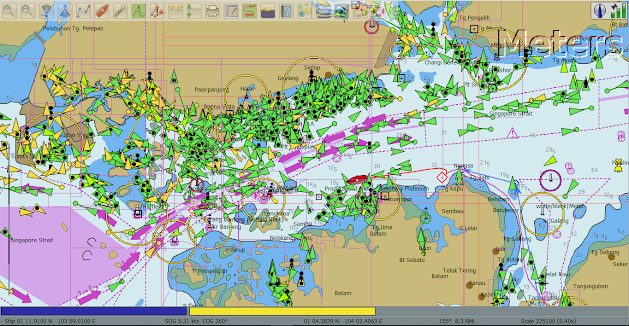
AIS targets around Singapore Strait, while it looks out of control, zoom in and concentrate on the task at hand, this makes it an easy job for the AIS to enhance watchkeeping, keeping the vessel and crew safe. 

On the other hand we have had nothing but positive experiences over the last 9 years and it has taken the heat off what could have been a developing close quarter’s situation several times. However it’s not all developing close quarter situations that the AIS system has helped to keep us and other vessels out of danger, but more on this later.  
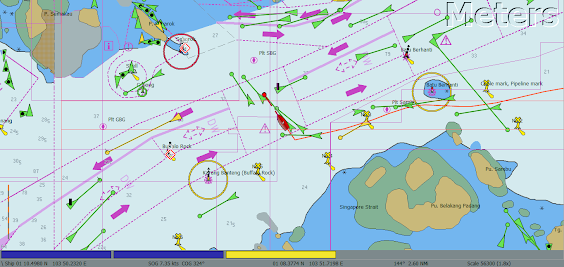
Zoom in and get a better idea of the surrounding vessels that may pose a threat.

I do know that AIS has become very popular with the sailing community and when sailing offshore its more likely to see private vessels fitted with AIS transponders than those without. I would like to give an over view of the AIS system, then I would like to talk about some of the errors we have seen and hopefully give an explanation how to spot these. If you can spot the errors early you may not fall into the trap like the cruiser mentioned earlier. 

What is AIS?

As the acronym suggests it’s a vessel Automatic Identification System. This system possibly one of the most substantial advances in navigation safety and an aid to sailors since the introduction of GPS (Global Positioning System) and RADAR (RAdio Detection And Ranging). Simply put, the AIS is a VHF (Very High Frequency) radio broadcasting system that transfers packets of data over a VHF Data Link (VDL). This enables AIS equipped vessels and shore-based stations to send and receive identification information that can be displayed on an integrated display, computer or chart plotter.

 Getting slightly technical, AIS operates on two dedicated channels in the marine VHF frequency band. The centre of the frequency is 162.000MHz. The two dedicated VHF frequencies used for AIS are; AIS 1 161.975 MHz (channel 87B) and AIS 2 162.025 MHz (channel 88B). 

When used with a graphical display, this information can help create situational awareness and provide a means to assist in collision avoidance. Additionally, AIS can be used as an aid to navigation, by providing location and additional information on buoys and lights. AIS uses a Time-Division Multiple Access (TDMA) scheme to share the VHF Data Link.
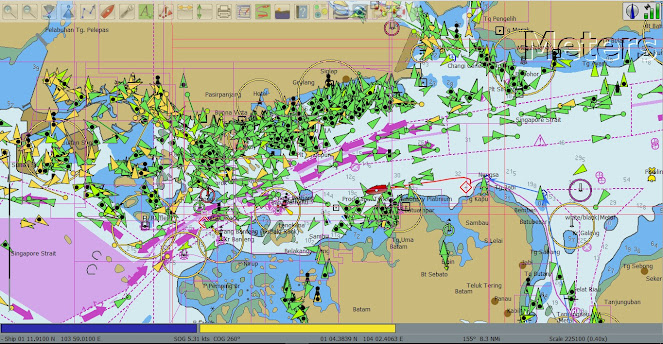
Lots to see - Base Stations- Vessels at anchor as well as NUC RAM CBD in transit, AtoN off position and ship AIS targets. While this is a crazy busy water way simply zooming in the chartplotter can make a big difference to how we can process the information.

There is a multitude of automatic equipment transmitting AIS messages, to avoid conflict, the radio frequency space is organized in frames. The VDL is divided into 2250 time slots that are repeated every 60 seconds (one frame) and each AIS vessel in range sends a report to one of the time slots. At the same time, every AIS vessel in range is listening to all the timeslots and can read the reported information. As transmission can happen on two channels, there are 4500 slots per minute. 

What types of AIS are there?

There is one system but as with a lot of things marine there are different classes. There are AIS mobile units and AIS stations. 

AIS Class A and AIS Class B:  AIS carried on board vessels.  
AIS Base Stations:                 AIS used for shore stations 
AIS AtoN:                 AIS Aids to Navigation
AIS SART:                 AIS Search and Rescue Transmitters
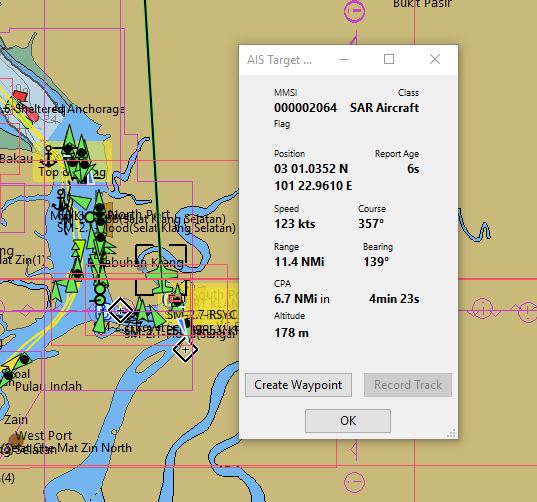
SAR aircraft:                 AIS fitted to Search and Rescue Aircraft
AIS MOB:                 AIS Man Overboard units / personal beacons /lifejacket units 

AIS is included in the International Convention for the Safety of Life at Sea (SOLAS) convention for: 
Vessels of 300 gross tonnage and upwards engaged on international voyages.
Vessels of 500 gross tonnage and upwards not engaged on international voyages as well as passenger ships irrespective of size. 
A typical tug and tow. Tug is not big enough for mandatory fitting of an AIS for domestic use unfortunately the length of tow doesnt come into the equation

The AIS referred to in the SOLAS convention is often termed ‘AIS Class A’. AIS Class B is intended for use on non-SOLAS vessels. A non-SOLAS vessel is a vessel to which the SOLAS convention does not apply. These can include pleasure and domestic commercial vessels. AIS Class B units have less functionality than AIS Class A units but they operate and communicate with AIS Class A units and other types of AIS units. So this means you will find some smaller commercial vessels fitted with AIS Class B transponders, this is something to be aware of when you’re out there looking for a pleasure boat and it’s really an old tanker. 
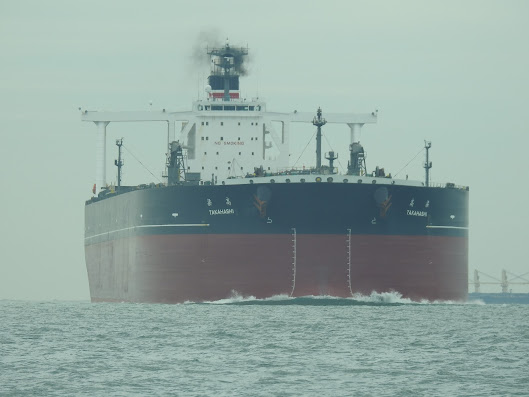
Class A Transceivers are designed for large commercial vessels, 350 metres long at 20 knots you don't want to get this wrong, and an AIS helps with the calculations of how much clearance you have when passing.

Class A Transceivers are designed for large commercial vessels. The system offers many features and benefits to larger vessels and these include:
12.5W transmission power
Comprehensive connectivity options, for connecting to on board systems (e.g. gyro, ships primary positioning, rate of turn indicator, log, ships internal network, via satellite to ships shore office)
Large screen for viewing targets
Mini keyboard and display
Enhanced environmental protection
Pilot plug
SOTDMA (Self Organised Time Division Multiple Access) transmission type
Three receivers (2 X AIS 1 X DSC)
Flexible transmission timing depending on voyage status (for example the speed the vessel traveling at)
Enhanced transmission type ensures all AIS data should get through
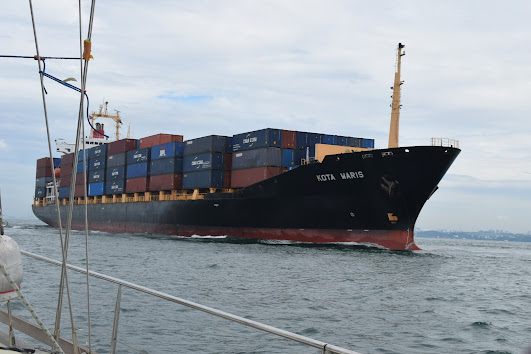
If you cant see all the bridge windows they very possibly wont have a visual on you, and at this range with their RADAR placement they will possibly miss your little return, however the AIS signal should get through. 

Due to their specifications, Class A devices are aimed at large commercial or passenger vessels. This is due to many factors including the extra power, space and antenna requirements. Class A devices are larger than other AIS devices due to the features included inside, they also require two antennas to ensure their data gets through, and output more power to maximise range. The main benefit of Class A devices is the increased range and 100% assurance that the AIS data will get through to the AIS slot map. Class A devices use SOTDMA to transmit their data. This is a system that reserves their data slots and therefore ensures their data gets through into the data stream.

Class B transceivers offer vessels most of the AIS features of Class A devices, but without some of the requirements needed for larger vessels. 

Class B devices offer:
Lower power, 2W, transmission output
Multiple connectivity option outputs to satisfy different display protocols 
Same number of transmitters and receivers as Class A, but used differently
Active GPS antenna/receiver incorporated in the device
Not interfaced to a compass / gyro, (brand dependant) so heading information rarely transmitted
Not interfaced to a computer system so voyage status is cannot be input and so is not transmitted 
Class B units operate using CSTDMA (Carrier Sense Time Division Multiple Access) 
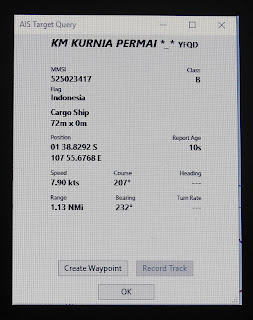
As seen in the wild a Class B cargo ship.


Class B units are designed for smaller vessels with fewer power options, less space and fewer antennas than a large commercial vessel. The lower transmission power means their range is significantly less than a Class A device, but this is compensated by the anticipated stopping distance in an emergency situation of the vessel compared to a large commercial vessel. The use of low wattage output was to give a range of five to ten miles. However, with the height of the antennas on sailing vessels and ships the truth of the matter is that distances of up to 24 miles are not uncommon in the right conditions.  Also, the devices are a lot smaller than a Class A device, ensuring they can be installed quickly and integrated to different chart plotters or displays. Output to the on board chart plotter or display is the standard AIS data stream at 38.400 kilobit per second and can be RS232 and/or NMEA formats, the NMEA formats can be 0183 or the newer NMEA2000. Due to space requirements smaller vessels rarely use a second antenna for the AIS. Most Class B vessels use an antenna splitter to share use of the antenna between the VHF radio and AIS device. CSTDMA type devices are regarded as polite devices as they scan (listen) for available slots and send their data into free space. They use both spare time slots and, to utilise the AIS slot map as efficiently as possible, use any available space in slots not reserved by Class A devices. 

Fishing vessels may be required to carry AIS, but any vessel may switch off its AIS if the master / captain believes continual operation may compromise the safety or security of the vessel.


Base stations offer a link between vessels sailing within range and are able to relay information from AtoN’s to a monitoring or command centre that may be located inland. Shore-based AIS transceiver operates using SOTDMA. Base stations have a complex set of features and functions.  Due to these features and functions base stations are able to control the AIS system and all devices operating therein. There is the ability to interrogate individual transceivers for status reports and or transmit frequency changes. FATDMA (Fixed Access Time Division Multiple Access) is also used by base stations, FATDMA allocated slots are used for repetitive messages. AIS base stations offer the chance to form an AIS network along a country's coastline that can enhance national security. Base station equipment can offer many different connections and data formats, allowing connections for many different display systems, including PCs, chart plotter displays, or wireless enabled devices. 
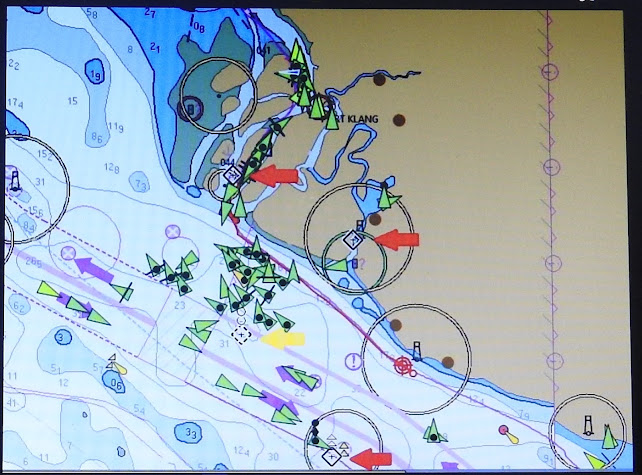
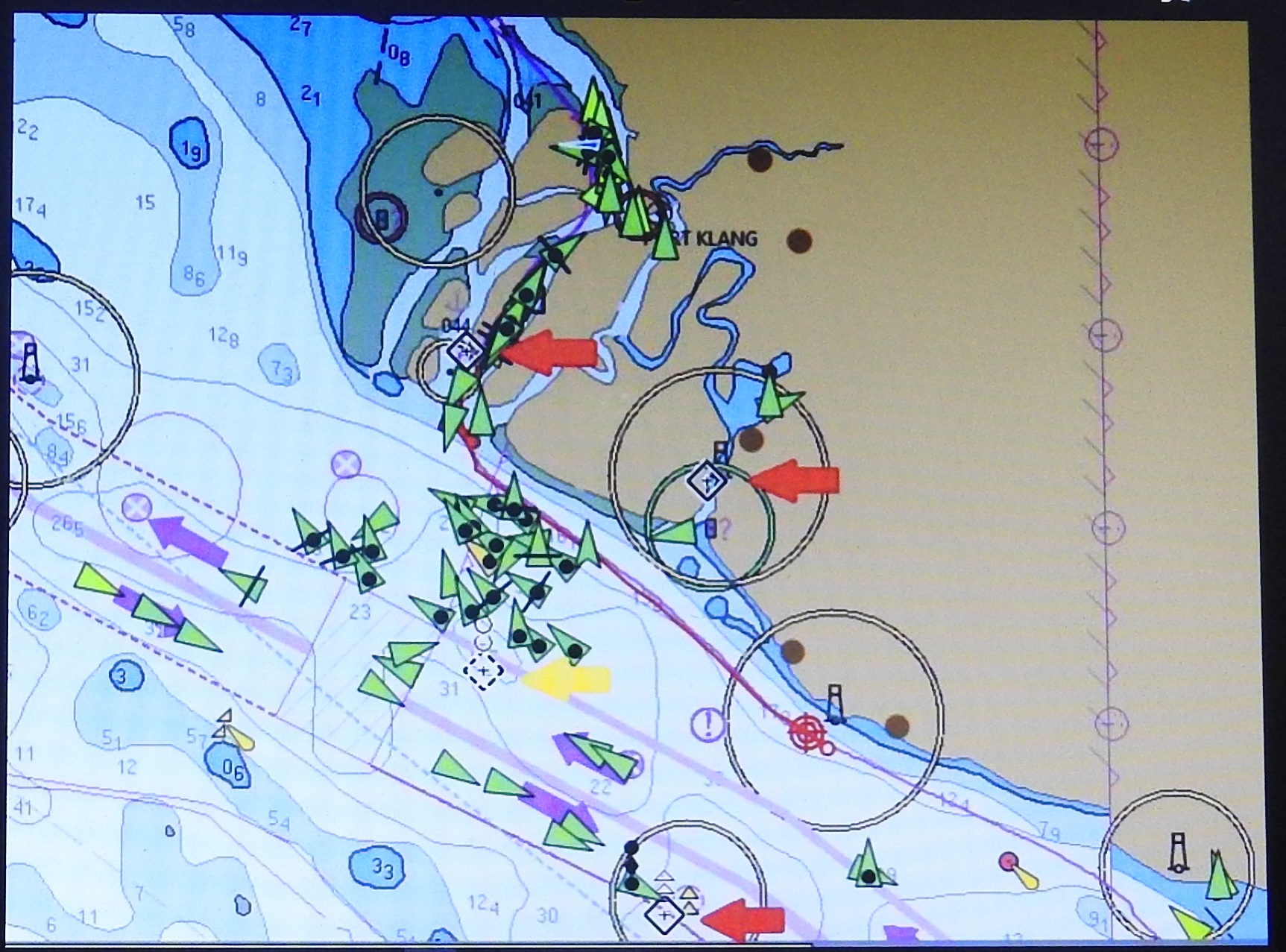
Port Klang with AtoN's Real are high lighted by red arrows The Virtual AtoN has a yellow arrow The red and yellow arrows drawn in by author for reference

AtoN units can be deployed on land or out at sea and have many benefits to both mariners and coastal monitoring centres. The key difference between the two types of AtoN is their power consumption. Keep in mind the AtoN stationed out at sea must rely on the power generated at the buoy, mostly done by using solar panels. An AtoN will use one of the two different types of transmission RATDMA (Random Access Time Division Multiple Access) or FATDMA (Fixed Access Time Division Multiple Access). Devices that use the FATDMA transmission type have their slots on the AIS slot map controlled by an AIS base station(s) ashore. This ensures their transmissions get through, while also keeping power consumption down. AtoN using RATDMA type transmission will use more power as they behave like a Class B device and must be powered up and running prior to sending so the unit can scan for available space on the slot map. To increase the range of an AtoN chaining can be used and this also has the added benefit of an increase in the range of base stations that monitor traffic along the coastline. These AtoN buoys / fixed beacons / light houses have the possibility of also housing sensor units that monitor metrological and hydrological data along with the AIS AtoN unit.

AIS SART: AIS Search And Rescue Transmitters
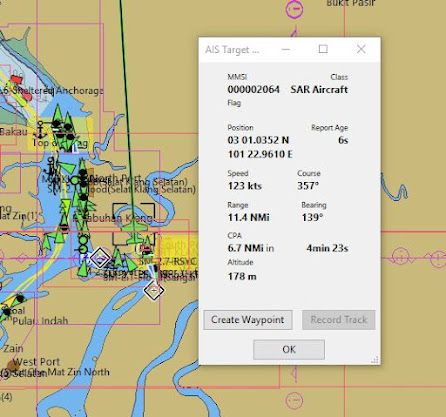
A SAR aircraft can be seen and on the chartplotter capture.  Pilot helicopters also have AIS fitted and can be seen as they are coming  and going dropping off or picking up the pilot. 

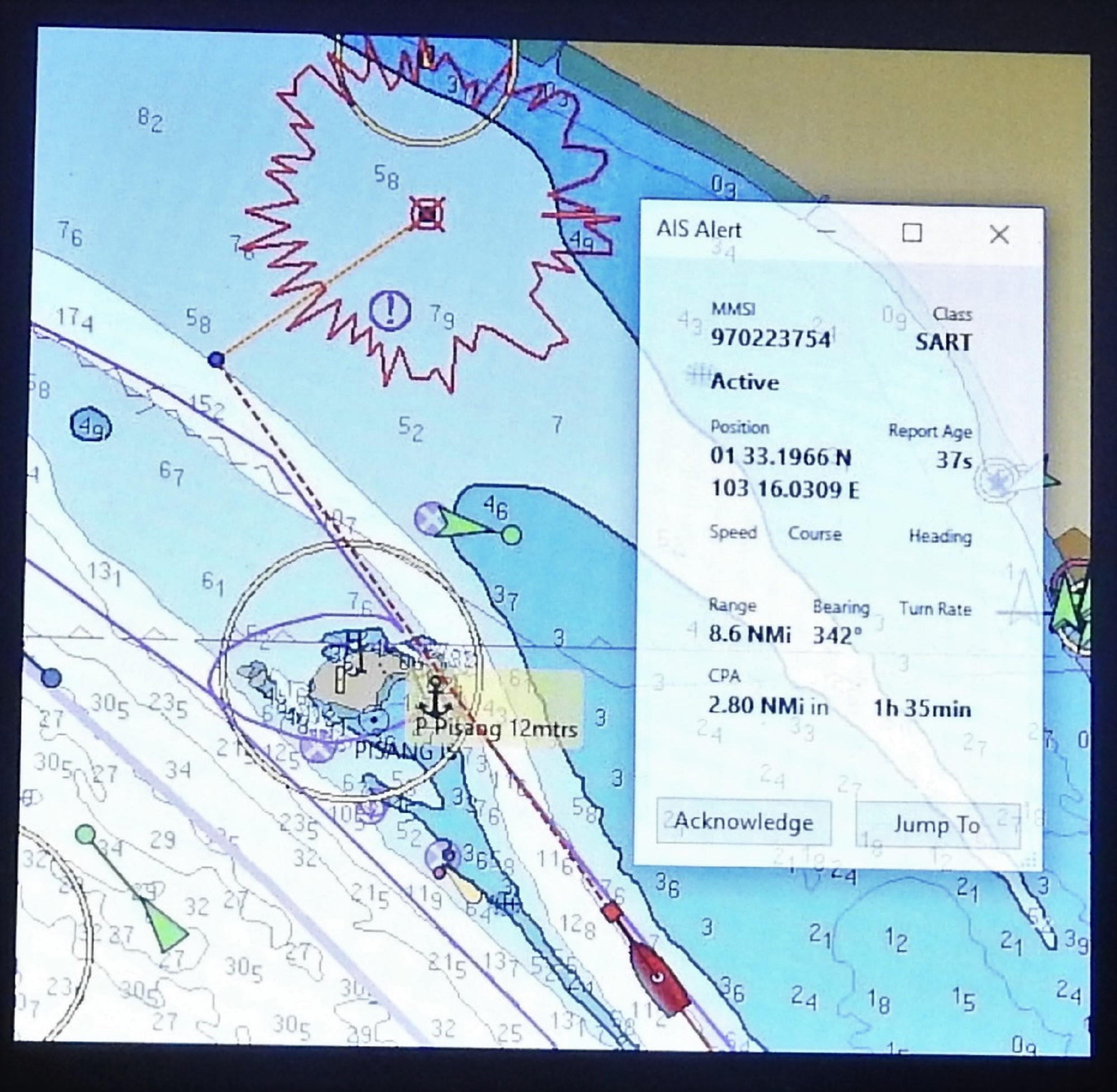
In an emergency situation, mariners have predominantly used a RADAR SART as a means to alert ships of their location if they are in distress. Unfortunately the RADAR SART has to be in the beam of the SAR ships RADAR to display a position on the RADAR screen. However, an AIS SART can offer many benefits including the ability to be seen around headlands, up rivers or behind islands, it doesn’t need a RADAR beam to activate it. AIS SART offer enhanced location finding in an emergency, by transmitting the position, heading and speed of the ship in distress / life raft's with the AIS data eight times in a minute. A safety message ‘SART ACTIVE’ is sent every four minutes. This is the primary benefit over other technology as it allows SAR vessels / aircraft to track and plan a course to intersect, and rescue the vessel occupants. 
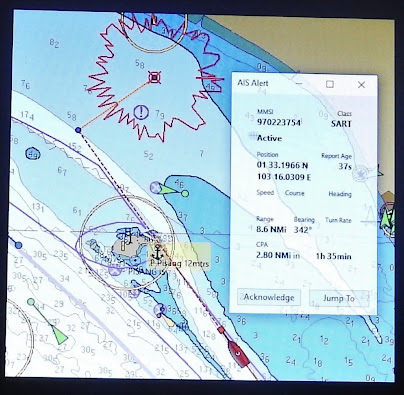
SART Activated Chart Plotter Drawing Passage to Distressed Vessel

A SART will use PATDMA (Pre Announced Time Division Multiple Access) as they continuously transmit but don’t receive. A SART does not Man Overboard units / personal beacons /lifejacket units receive any data, it’s just a transmitting device. The device sends the information often to ensure that the vessel in distress is at the peak of a wave on at least one of the transmissions helping to maximise the range of the one watt transmitter.
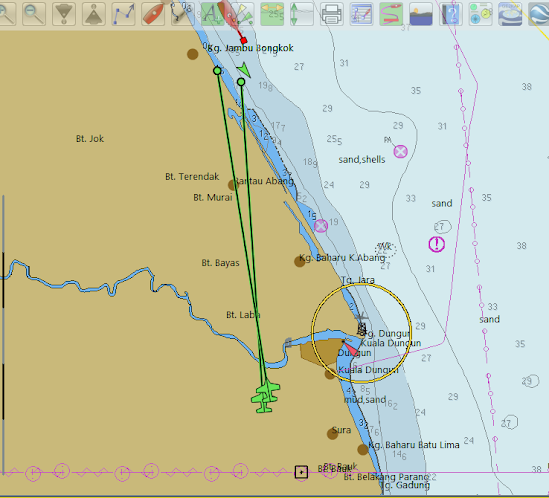
Two SAR aircraft


SAR aircraft: AIS fitted to Search and Rescue Aircraft to aid search and rescue tracking AIS SART’s. However most systems display a SART once activated, I know both my ship board display units come up with a warning that a SART has been activated, then the system will ask if I want to lay a course to steer to an active SART. 
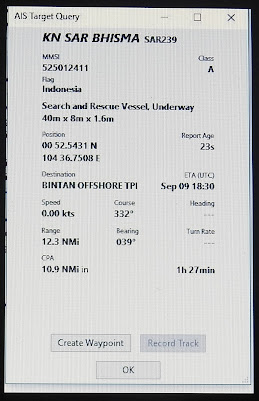
Search and Rescue vessel 

AIS MOB: 

Know the difference between an AIS PLB and a PLB

There are PLB’s (personal locating beacon) and AIS PLB’s, make sure you get to know the difference between an AIS MOB beacon, also known as an AIS PLB and a PLB so you purchase the correct one for your needs. 

Step one: While these AIS units are not new on the market, before purchasing a beacon check if the one you are thinking of purchasing is authorised with AMSA and ACMA (Australian Communications and Media Authority)  to be on the AIS network. (Some are not due to the transmission type)


Step two: it's imperative to know how your boat's electronics will react to an AIS MOB transmission. If your AIS system/ chartplotter won’t display the AIS PLB then it could turn out to be a costly exercise upgrading the AIS display unit. The primary reason for the purchase in the first place is self-rescue, unfortunately not all AIS display devices do it correctly yet. 

Step three: The positive side of testing is that it is important to know how to activate the device manually before you find yourself trying to figure it out in desperate circumstances. Remember that even if it's supposed to activate automatically, sometimes things go wrong with the automatic function for a multitude of reasons.


The similarities between AIS and RADAR

The good thing is AIS has been designed and manufactured to work automatically and continuously, regardless of where a vessel is located.  In the early advertisements AIS was touted as being RADAR like, however this is not the case at all. The only real similarities between AIS and RADAR is that the displays can be configured to look similar. Perhaps this is what the advertisements meant when they describe AIS RADAR. But the reality is RADAR transmits a pulse of extremely high frequency electrical energy that reflects off objects returning to the point of origin, after several pulses have been received, and after undergoing signal processing the blip or returned pulse is displayed on a RADAR screen. 
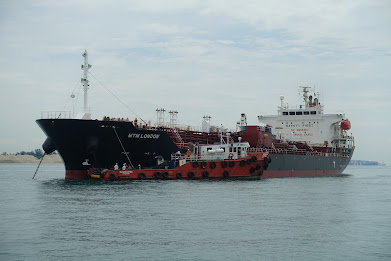
Vessel being shielded from RADAR by a larger vessel 

While RADAR is good the information that can be received form an AIS target can be better in some respects. In most cases we are able to, read data sent from the AIS target on the display device (chart plotter) by various means and get a host of information. The process to read the data transmitted from the target will be dependent on the chart plotter brand. On some display devices just moving the cursor over the target will display a list of data. Different brands of devices will require more or less button pressing and cursor movements but usually the important information is there at your fingertips. But don’t stop using the RADAR once you have AIS, just keep in mind it is very good at double checking the AIS target is transmitting its correct position. Or perhaps check for vessels out there that are not transmitting an AIS signal at all. For some of you headed to Asia, a word of warning; at night be on the lookout for tugs, the lights are usually correct for the type of tow, but mostly they don’t transmit AIS due to being domestic carriers. The good news is that the extremely large barges they tow can be good RADAR reflectors. 
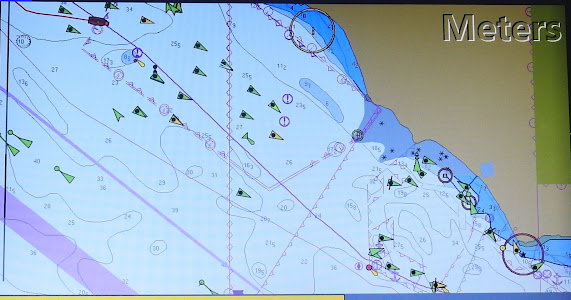
A closer look and see several vessels rafted up, not easy to spot with RADAR

With AIS information that can be called up and displayed is the target vessels, identity, position, current course, heading and speed. If your vessel is equipped with an AIS transceiver all this happens while also providing your information in real time to the other AIS system users. VHF frequencies have a longer wavelength than RADAR, AIS signals can be received from behind breakwaters, headlands, up river bends. It is also good for seeing vessels behind other ships in close quarters situations where a RADAR signal will not see or is blocked. So just this feature of the AIS signal alone can add to safer navigation by detecting the position(s) of a ship(s), even when tucked behind an island or hidden from view behind another larger ship.

If you are busy hanging on and find it’s getting difficult to check the vessels around you as the weather deteriorates. One of the features on most chart plotters or navigation software with integrated on-board AIS systems is the function to set alarms. These alarms can warn you if and when you will get too close to another vessel. These collision avoidance alarms are an advantage and can save you so a lot of time and anxiety when navigating across busy shipping lanes or in bad weather. Unfortunately this information is only as good as the data the AIS on your vessel is receiving and still requires a human for the interpretation / cross checking of the data. A vessel moving along at two knots may actually turn out to be towing another vessel on massively long cable. 

The two alarms that can be set up; CPA (Closest Point of Approach) and TCPA (Time to Closest Point of Approach). It will depend on the brand and setup of the AIS system as to how these alarms are set, the best thing to do is to read the manual. Most systems will allow you to enter your own CPA and TCPA values for when the alarm will be triggered and so you need to decide how close you want to let other vessels get to you (CPA) before an alarm sounds and also how much time you need to take avoiding action (TCPA). Remember give yourself time for an out, especially when the vessels you may need to avoid are over three hundred metres long and traveling at twenty five knots. 

You might decide that 1NM is plenty close enough for a large ship to pass and you want to have at least twenty minutes notice so that you have time to take avoiding action and/or call them on the radio.

Careful use of the CPA and TCPA alarm can certainly make your trips safer, however as I said before read the manual and familiarise yourself with how your particular system works. The down side to all this automated system process is that when entering a harbour or anchorage. You may want to know how to turn off the alarms temporally otherwise they are likely to drive you crazy when they keep going off reporting a moored or anchored vessel is a dangerous target. 

While it’s all well and good to set CPA and TCPA alarms, in most cases you will still need to interpret the data and make the call on whether you will be crossing ahead or behind the vessel you have been tracking.  It can make a big difference, crossing a quarter of a mile astern of a vessel moving at twenty five knots isn’t a problem but I wouldn’t think about trying to cross the bow at this range.  One thing to keep in mind when coming up on large ships is their positioning antenna placement. You may find that a large ship has almost three hundred metres (0.16nM) of ship ahead of the position reported on the AIS. 

Due to the great safety benefits offered by AIS, the network has continued to mature and expand to fulfil the design brief. Now combined with shore stations, this system offers port authorities and fully equipped maritime safety bodies the capability to manage maritime traffic and reduce the hazards of marine navigation.

A safety feature of the AIS is the AtoN (Aids to Navigation) can be transmitted over AIS. These can be physical aids like beacons, buoys, light houses fitted with an AIS transceiver or they can be computer-generated (virtual), like ones used to mark a new or temporary danger such as a shoaling bank or wreck. The computer generated AtoN can be set up and working quickly and is all done without the need for a marker/buoy to be physically placed on the dangerous point. 

AIS can also be used to identify if navigational aids have moved from their charted position. As an example if a beacon or floating buoy fitted with an AIS transmitter is noticed as not being in the correct location corrective action can be put into motion quickly. Maritime safety bodies can send safety messages that might include developing storms, other weather events or search and rescue information. Additionally safety messages can be issued from either a ship or maritime safety stations. A ship that is underway but not able to manoeuvre properly due to some exceptional circumstance may issue a broadcast warning that they are now ‘not under command’. 

The AIS system has many features that have the ability to bring immense benefits and collision avoidance to sailors.  Important when on coastal passages and entering or traversing shipping lanes, these features are especially useful for shorthanded crews, e.g. cruising couples. AIS does not replace a proper look out, but it can add enhance situational awareness for the person on watch.  Because the AIS can handle 2,250 reports per minute and may update information as often as every two seconds, real-time changes of another ship's movements can usually be immediately recognized.

The following shows what information each type of transponder will receive from the other.

Class A   To   Class A & B Class B  To Class A & B

Position         Position          Position    Position

Speed Speed Speed Speed

Course Course Course Course

Heading         Heading        Heading* Heading

MMSI MMSI MMSI MMSI

Name Name Name Name

Call Sign Call Sign Call Sign Call Sign

Vessel Type Vessel Type Vessel Type Vessel Type

IMO number IMO number

Voyage Data Voyage Data

*Heading data rarely sent needs gyro input to AIS

Data Transmitted

1. Static Information (Every 6 minutes and on request):
IMO number
Name and Call Sign
Length and Beam
Type of ship 
Location of position fixing antenna

2. Position Report: This message is sent every 3 minutes where speed over ground is less than 2 knots, or every 30 seconds for greater speeds.
MMSI number
Ship’s position, longitude, latitude, true heading with accuracy indication
Position time stamp (in UTC)
Course Over Ground (COG)
Speed Over Ground (SOG)
Rate of turn – right or left, from 0 to 720 degrees per minute

3. Voyage Related Information (Every 6 minutes, when data is amended, or on request)
Ship’s draught
Type of cargo
Destination and ETA
Route plan (Waypoints)

4. Short safety related messages

Text messages free form and can be addressed to one or many destinations or to all stations in the area. This content could contain information such as a buoy missing, off station or flotsam sighted.

Here is the COL regulation rule 5: Every vessel shall at all times maintain a proper look‑out by sight and hearing as well as by all available means appropriate in the prevailing circumstances and conditions so as to make a full appraisal of the situation and of the risk of collision. 

Like all things electronic there is a possibility for errors to creep into the system when things malfunction without totally failing.  If you can spot the errors you may not fall into the trap like the cruiser mentioned earlier. Remember the accuracy of AIS information received is only as good as the accuracy of the AIS information transmitted in the first place.  It’s not prudent for the crew on watch to assume that the positioning information received from other ships is as accurate and of the same precision as that available on their own vessel. 

Operational problems seen

What type of vessel is it?

Don’t always take the ship type listed in the AIS information to be one hundred percent correct. We were heading out from Tioman Island Malaysia across the busy South China Sea shipping lane to the Anambas Island group. We had been tracking what we believed at the time a fishing vessel traveling along at two knots. Possibly trawling or so we thought at the time. They were several miles off at the time we started to pick them up on the AIS and track their course. Due to the current, weather and our sailing angle we were on a near collision course. Ok this won’t be a problem we will just point a little more on the wind and go astern.  Then as time progressed we got a glimpse of a very dim light astern of the supposed fishing vessel.  With the RADAR set at the highest gain range, we got a very intermittent and weak return from something tracking along at the same speed as the AIS target. This is where it got silly (very unusual), his lights were not right for a tug with tow, so we started using our spot light to try and get a glimpse of what was trailing behind our AIS target. This resulted in the tug/vessel blacking out all his lights and turning off his AIS. Well we now had a fair what we were dealing with and then it wasn’t long before the dim light on the tow also went off.  So we started the motor, changed tack and was able to pass ahead of the tug.   It appears that perhaps the tug/vessel skipper was paranoid about being boarded by pirates. So we think he had set the vessel type to fishing vessel, then went into hiding when a small boat (us) was trying to shine a light his way. If only he knew even with no lights on his vessel was still very visible through the binoculars.

Why don’t I always see the vessels name dimensions or other data?

This problem is due to the operation of the system, shipboard AIS units separately broadcast different AIS messages:

A 'Position Report' which includes latitude, longitude, position accuracy, time, course, speed, navigation status. Position reports are broadcasted frequently between two to ten seconds depending on the vessel’s speed or manoeuvres, or every 3 minutes if at anchor.

A 'Static and Voyage Related Report' which includes name, dimensions, type, information regarding its voyage (e.g. static draft, destination, and ETA), static and voyage related reports are sent every six minutes.

So it’s normal for an AIS to receive numerous position reports from a vessel before the vessel name, type and data associated with a static or voyage report.  A fault with the AIS can also result in the missing data, one vessel we sailed with for some time had an ongoing problem and it was rare we would see any of the static vessel data blanks filled in. It turned out the wire used for the cable run from the navigation panel to the AIS was inadequate and the AIS unit would be in continuous start up loop. It would transmit a position report and when doing so the unit would shut down due to lack of voltage then restart after transmitting. So it never ran long enough to transmit the static information. 


Why do we see vessels reporting they are at anchor traveling along at speed?

This would most likely be a Class A unit. Class A units allow the input of voyage related information, in this case the person in charge of inputting the information hasn’t done the job or forgot to hit the return key.  The other voyage information transmitted from this vessel may or may not be correct. Usually a call to the vessel in question will result in a hasty update. 
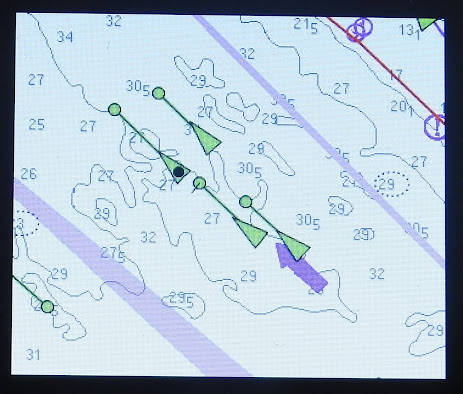
Doing 13 Knots and displaying the anchor symbol. More likely it wasn't updated before setting off. 


From time to time we see the “Inland Blue Flag” set, it's a part of the European, Inland AIS standard. The “Blue Flag” signal, commonly seen on inland waters, indicates that the vessel requests a “stbd-stbd” passage or crossing. This Blue Signal is manually switched on/off, by the target. We can only assume these are not turned off when leaving Europe, or have been set on by untrained operators. 

The RADAR target and the AIS don’t always correspond.

This error can be caused by a multitude of reasons. The speed of the vessel you are tracking may be the cause of what you are seeing. The slower the vessel is traveling the more time between the position reports. I have seen a few vessels that did have a fault and even at speed the position reports were several minutes apart.  The best thing to do is call the ship and let them know they may have a problem with their AIS and explain the fault. We have seen vessels in the data list notated as being in the northern hemisphere, and were in front of us coming up the NSW coast. So obviously their AIS had a hang up or the connection to GPS or ships navigation system had a fault. 

What else could cause an error? AIS position data received from another ship might not be referenced to the WGS 84 datum so if the data on your vessel is, then there will be a discrepancy in the displayed position and their real position. The discrepancy will be distance. How much distance? This will all depend on the datum they have selected their system to run on.  

Why don’t the CPA and TCPA look right for a ship pointed straight at us?

Check the vessels course and heading match up to within a couple of degrees, the closer the better. More than likely this is a set up error or the gyro connection to AIS unit wasn’t wired in correctly when the system was installed. Ships GYROs use different systems (formats) to output course data, a crossed over wire at the interface or an open circuit on one pair can cause an incorrect output without causing a total failure or error condition at the AIS unit.   Be aware of this condition, a lot will depend on the brand of chart plotter or display device on your vessel. Some chart plotters don’t show targets as anything other than a triangle. If this is the case then scan your targets data when they first come into range. We have seen several ships with this error, unfortunately once we contact them and let them know of the failure they brush it aside or don’t understand. A very well spoken watch officer on a cruise ship brushed it aside treating us as if we were being a nuisance.  The screen shot of the MV Menang Jaya gives a good example of this fault, the vessels COG is 299 degrees and his heading is listed as 186 degrees. His COG more than likely is being calculated by the GPS device in the AIS or the vessels navigation system, from what we saw this was correct, the heading information will most likely be coming from the on board GYRO and was wrong. 
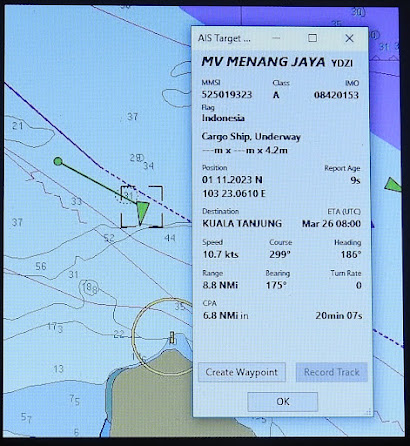
The course over ground and heading don't match up, we saw this vessel several times, unfortunately English as a second language didn't help them when I tried to explain that they had a possible Gyro connection problem, 

We recently sailed in Indonesia with a couple whose AIS reported the vessel was heading 000 degrees. However their COG would change to report the vessels direction of travel at the time. This turned out to be a fault with a GYRO card fitted in the all in one unit (Chartplotter, AIS, GYRO). This fault did give several ships watch keepers a fright when they thought they were going to run them down. 

Simular error symptoms but the COG and heading match up. Check the report age, this is very important, some AIS units will hold a target static for some time when data has not been received. I have seen ghosts where the data is several minutes old. Large ships traveling at 25 knots can travel a lot of distance in this several minutes. AIS doesn’t relieve you of watch keeping duties of using every means possible, use your eyes to first scan the horizon then the AIS data on the chart plotter information page.   
  
As I have said earlier the accuracy of AIS information received is only as good as the accuracy of the AIS information transmitted

When I am looking at a web site for AIS sometimes I don’t see all the vessels?

Under SOLAS and the relevant IMO guidelines, the Master of any vessel has the discretion to turn off the AIS unit if its continual operation might compromise the vessel's safety or security.

The publicly available AIS websites (such as Marinetraffic.com) use a crowd-based approach to gather AIS information. The International Maritime Organization (IMO) has condemned the display of AIS data on public websites. The AIS receivers used for this purpose are not certified AIS base stations and may not provide accurate or valid data. We have also found that the opposite can also be true when vessels are still shown as being live on the web site even when they haven’t had a received transmission for a day or more.  However an even scarier feature is the ability for people to call their vessel position in on a mobile phone, without even having an AIS transceiver. Be very careful if you want to go down the AIS over the internet approach, good luck with that, it’s a recipe for disaster. 

I have been told the range of my AIS is very limited 

The AIS unit can have its own antenna or by using a splitter, can use the same antenna as the VHF radio.  The loss in sensitivity to the VHF radio by adding a splitter is marginal and should not be a problem.  However some older VHF antenna may not be suitable for AIS as the frequencies used are on the edge of the marine band and some aerials do not work well at the band edges. If you’re VHF voice transmissions are getting out and you have good range then perhaps it is time to look at the antenna you are using. Another thing to check is your cable runs. In most cases the VHF antenna is at the top of the mast, this can help with extending the range. The down side is the cable run is long and if the cable run up the mast is not low loss coax cable then this could be the source of some signal loss. All said and done a check by a radio tech / electronics tech should be able to give an answer on whether it’s the radio, splitter, cable or antenna.  

If you are using a splitter check to see if it has any status lights on the front, I have seen active splitters malfunction from time to time. Splitters appear to be especially sensitive to lightning storms and the storm doesn’t need to be close. A power reset will sometimes do the trick and it will function as it should after turning it off for a little while and then powering it back on.  

 If you are using an AIS transceiver, the splitter must be suitable for transmit use; this is certainly worth checking if you are upgrading from a receive only unit. 

Keep in mind that if the VHF radio is using the same antenna as the AIS sometimes the AIS targets will disappear from your chart plotter when using the VHF radio. This usually depends on the length of time you have been or are on the VHF. When I was using a passive antenna splitter I had problems when in a heavy shipping areas. Voice communications were interrupted by the AIS as it was still sending during a voice transmission. To get around this I installed an active splitter, this always gives priority to the VHF radio transmissions and also has a fail-safe feature where it is designed to protect/maintain the VHF connection in the event of the splitter circuit failing.

Disasters Averted

I know from experience the AIS system has aided rescue or has helped keep people out of trouble. 

The first was when a catamaran was moving through the Barrier Reef area and a ship contacted them by name and let them know they must take evasive action now or they would be run down. They took evasive action and was able to power out of the ships way quickly. 

Another time when moving through the Barrier Reef area up near Flinders Island, an EPIRB had been activated and through the aid of AIS the Reef VTS was able to contact the two closest boats to the activated beacon. As it turned out that was ourselves and a vessel we were traveling with at the time. The others were slightly closer and were able to find the distressed boat (broken down tinnie) and tow them to safety.  

Before heading into the channel between the two main islands of the Kai group in Indonesia I was tracking the progress of a vessel already in the passage.  As I was watching their progress thanks to the AIS, I noticed they were headed for a shoal area at seven knots. I called them on the VHF to let them know my charts showed they were possibly sailing into trouble.  As it turned out the older chart plotter chip they were using in the cockpit did not have the shoals marked, but the newer chip used below showed the rocks and shoals clearly.  If it wasn’t for the fact I was able to track their progress thanks to the AIS a disaster was averted. 
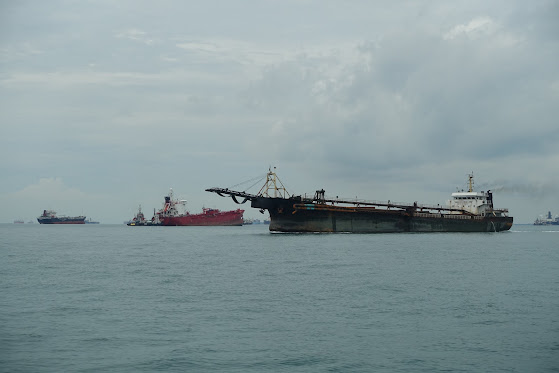

A large sand dredge, it was normal for them to raft up as they worked or refueled 


While not easy to see at first there are a lot of vessels rafted up together in pairs. Zoom in the chart plotter is the best way to keep on top of the problem. 

While moving through a crowded ship anchorage we were coming up to a large tanker, thanks to the AIS we were able to see a dredge was about to come out from behind the tanker at speed. Because of the proximity of the moored tanker and the lack of manoeuvrability in the anchorage the dredge was shielded from both our vision and the RADAR beam. The good thing was that we were able to take evasive action well before a close quarters situation arose. 

To sum it up

The AIS only improves the safety of navigation by assisting the person on watch. As with all navigational and/or electronic equipment, the AIS has limitations. Always keep in mind that the accuracy of AIS information received is only as good as the accuracy of the AIS information transmitted in the first instance. Users must be aware that erroneous information might be transmitted by the AIS from another ship.  Try not to become over dependant on the AIS as this can cause complacency on the part of the watch keeper. If the person on watch isn’t keeping a vigilant watch out on the real world, there could be developing close quarters situations when ships where the AIS, if fitted, is switched off.  While there is talk of errors with the system, analyse the data available from several sources and by using the AIS as another tool (not the only tool) good decisions can be made to keep your vessel safe.

For as little as sixty australian dollars you can have a stand alone AIS receiver using a USB, RTL software defined radio and some free software loaded up on your laptop. An internal connection to OpenCPN and you have a setup that will display class A and B AIS targets on your charts in real time. 

Satellite Navigation and Satellite based Augmentation