Showing posts with label Power. Show all posts

Sunday, 19 March 2023

Do you want to run an Inverter

 The Inverter is an electronic device that converts a DC voltage to AC voltage. Cruisers usually want to convert ships 12 volts DC battery power to 110 or 230 volts AC. 

 We love having an inverter on board and it gets used on a daily basis, we do use the inverter to power the washing machine, kitchen and workshop tools and it really makes our life on board easier . 


A bare bones Pure Sine Wave inverter fitted in Matilda. 

This inverter is a combi unit and includes a built in battery charger for when we are connected to the shore power at the dock. By bare bones I mean it does what its meant to do very well, it outputs a single phase  pure Sine Wave and charges the batteries when connected to the dock power. It doesn't have a lot of the bells and whistles that most cruisers dont really need. While they may be necessary for complex installations, for most of us they are unused and are just an added expense and that money could have been used elsewhere.   

--------------------------------------------------------------------------------------------------------

Before we get started basic abbreviations and power rating.

A well used electrical calculation:  Watts = Voltage multiplied by the current in Amps;  W = V x A

AC is an abbreviation for alternating current:   an electric current that reverses its direction many times a second at regular intervals, in Australia its 50 times per second and in the US its 60. also known as Hertz or Hz. Output is from a portable generator, inverter or mains (the big generator at the power station) 

The AC wave form, output from a Sine Wave Inverter or generator. 

DC is an abbreviation for direct current: an electric current flowing in one direction only. Output is from solar cells, batteries. 

RCD Safety switch: An RCD switch will operate when there is an imbalance in the current flow in the active and neutral conductors. Once this imbalance reaches the set threshold, usually 30mA, it opens the circuit, cutting the power output.  A lot of people believe that an inverter is safe and will cause no harm because it runs off batteries. However this is a false sense of security, the power from even the smallest inverter can kill as quickly as a mains power point. So it is certainly recommended a RCD safety switch be fitted.  For a discussion on safety switches
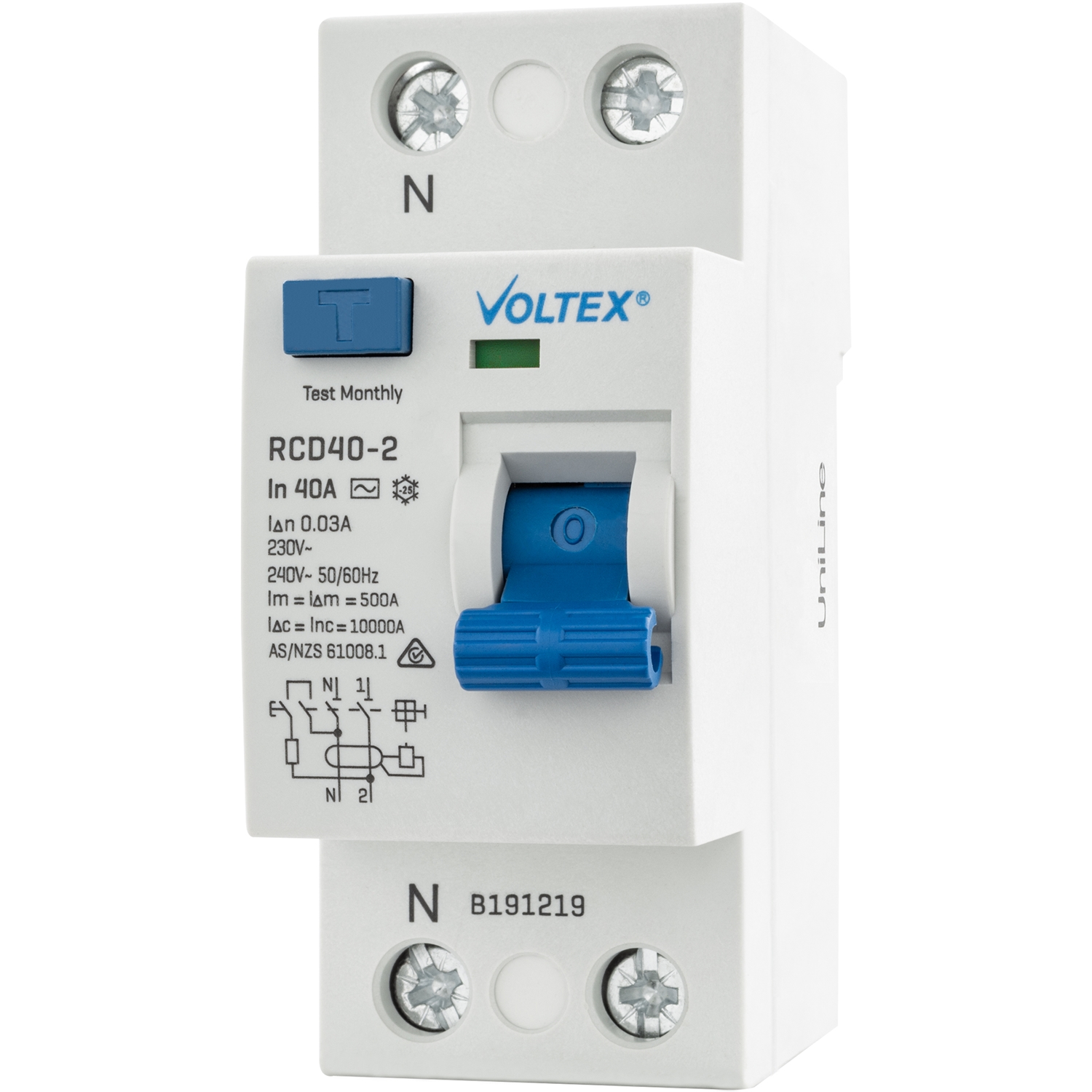
RCD Safety switch to reduce the chance of being electrocuted from the output of an Inverter

--------------------------------------------------------------------------------------------------------- 

Why have an Inverter when you go cruising?

In Australia we all have 230 volts AC as the primary mains voltage source at home, we already have many appliances that run off 230 volts, it may be the high powered microwave oven or the very low power charger for a laptop, tablet or camera. An Inverter allows you to use the appliances you already have when you are away from the shore power. The disclaimer here is that the inverter type and size has to be matched to the appliances you want to use.

Benefits of using an Inverter

Instant power with the flick of a switch, no turning on the gen set, or switching over the source of the power. The main reason for most people is that there is a wide variety of appliances. Using an Inverter can save you the cost of replacing the appliances you already have at home with 12 volt equivalents. In some cases 12 volt appliances are more expensive due to lower sales, or possibly they are not available for every application.

Why a lot of Cruisers buy an Inverter

A lot of cruisers like to take the convenience of household appliances out on to the water with them. There are so many appliances used in the kitchen or workshop that make quick work of tedious jobs. I use a powerful mixer on a daily basis to knead bread dough so we can have a fresh loaf of bread while we sail offshore miles from land. Using the appliance we reduce the kneading time from 20 min to just 5, not that we don't like the upper body workout, we like using that time to do other jobs. There is just about an appliance or power tool to help with most jobs, and we have met people who use some appliances we never thought of taking on board, it's only limited by imagination, storage and of course battery bank endurance.

During our travels we have met with dozens of cruisers who had planned fitment of their inverter during preparations before going cruising. The cruisers then executed the install and had the 12 volt side of the inverter connected with the right gauge wire, fuses and safety grounds. They can also have wired in power points outlets to make the inverter use convenient. By having the inverter properly installed they were able to install and configure a RCD safety switch and circuit breakers to protect the people and appliances. Add on kit for an RCD info here

There is also another good reason a lot of people buy an inverter, they do not know there are 12 volt alternatives for the most commonly used items. So what are these commonly used items? most of the time its battery chargers (phones laptops, cameras) and TV’s, and this is why so many people buy an inverter, they head off to the marine/camping/electronics/tech shop to get something to charge their laptop, phone or even the head torch, and really the list is almost endless these days. The sales person quickly takes the customer to the inverter section and gets a quick sale. The customer goes home not realising there are other products out there that can charge and run their small appliances and in nearly all cases are a lot safer and much more efficient at doing it than an inverter. But more on that in another post.

Being on a yacht we want products that make use of stored electricity in the most economical and safe way. Unfortunately for just charging laptops, phones and these types of appliance, a small inverter isn't always the best and or safest option. This is why we feel its a great idea to have a balance of electronics to do the jobs on board. This way should the inverter fail (happens from time to time) you can carry on with minimal disruption. 

Please read on, for other uses an inverter can come into its own, if set up correctly.

Operation

A great reason for using an Inverter is, being much quieter than using a generator to produce the AC power, and when your running off batteries, there are no concerns about fumes or heat from the exhaust, and no flammable fuel to handle. If the generator isn't built in and running on the ships fuel, most of the small portable generators popular with cruisers run on petrol. This adds the complexity of firstly safely storing the generator and secondly the fuel to run it. The storage of petrol does have its complexities on a vessel designed and fitted out as a diesel fuel craft.

Versatile

An Inverter can be used whilst the vessel is running, and therefore not draining the house battery. Unless your a sailboat and having a good day out in a nice breeze. When motoring this has practical applications; ie arrive at the anchorage with fully charged batteries, camera batteries, laptop, and so on and so forth. 

For safety an Inverter must never be switched on when you go to start the engine unless you have a totally isolated motor start battery. If you don’t the surge of current required to start a boat motor can drop the voltage down below 10V DC. After the motor is running and the alternator kicks in, it will surge back up to 12 V DC, the combination of surges can damage the inverter, the appliance running on the inverter at the time or of course both.

Interpreting the numbers written on the inverter

An Inverter changes the voltage and current, the power it puts out is always less than the input power, due to inverter efficiency being less than 100%. Most, but not all inverters list the operating power in watts, a big inverter may output 2500 watts so if it really is outputting 2500 watts at 230 volts that will be 10.86 Amps output, just over the maximum of a standard power outlet in Australia. This large inverter is capable of running most appliances easily. However keep in mind most of the numbers on the case i.e. 2500, the inverter will not really output 2500 watts. One that I know of will output 2300 W and another that has 3000 on the case outputs 2200W, so the reality is that you need to read the spec sheet to see the real out put value.

On the other end of the inverter scale is small inverters with an output of, for example 300 watts, this will be 230 V at 1.3 amps, and would be enough to run most laptop chargers. 

An inverter is usually between 80% and 90% efficient. The 10 – 20 % of power that is lost as electrical energy escapes as heat energy in the Inverter. While this doesn't sound too bad if you crunch some numbers when operating at higher power it can be a significant current (in Amps) drawn from the batteries that is wasted energy. 

So as an example of power loss, if an inverter is drawing 100 Amps and is 80% efficient then 20 amps  will be wasted power and converted into heat. 

Electrical Power

Electrical power is usually measured in Watts (1000 W = 1 kilowatts, 1 kW). So to keep it simple an inverter that outputs 240 volts at 10 Amps is 2400 Watts (240V x 10A =2400W)

Some Inverters output are rated in VA (Volt-Amps) rather than Watts and for many appliances this will equate to the number of Watts with a power factor of blah blah blah, well beyond our ability to calculate the actual value. The simple truth of the matter is VA means nothing. If you want to know how much power your inverter is going to give you then ask for the rating in watts at 40 deg C, all the other ratings should be kept for the fairy tale books where they belong. Some brands of inverters have a lower value in the model name but, in fact, are the more powerful of the bunch when apples are compared with apples (watts with watts). So shop around for a unit where you get what you think you should be getting, and it does what it says on the box it does. Do the comparison in Watts at 40 deg C apples with apples, (watts compared with watts). I do know some manufactures use lower temp rating to give better figures, however unless your operating your vessel in the lab then the 25 deg C isn't really achievable. Its all in the advertised wording. 

Peak and Continuous

Two numbers are used to describe the output of an Inverter, Peak and Continuous.

Peak (or surge) describes the output deliverable for several seconds the Inverter components won't blow up at that amount of load, but they will heat up really quickly. Continuous ratings are usually limited by the heat that needs to be removed when running continuously. Ideally you would find out the Peak and the instantaneous ratings of your appliances and check that they were less than the Inverter output, but you can't rely on this because most appliances don't state the start-up or peak power and the length of the peak really needs to be known too. Unfortunately, the only way to be sure, is to test the appliance with the inverter.

For safety never run the inverter continuously at full power for long times, I have a safety margin in the order of 10% factored in to our calculations for long run times as this allows for the odd surge. 

Size of Inverter Needed

The following table is only a rough guide as there is a lot of variation in startup surge load and continuous load for similar appliances between makes and different models.

Size of Inverter Required Type of Appliance

150 watts - Charger for cameras, laptops, some power tools, DVD player; coffee grinder
250 watts - TV, slow cooker, desktop computer, electric blanket, kitchen mixer, printer
500 watts - Small fridge, freezer, small angle grinder, drill, TV, washing machine (no water heater)
1000 watts - Bread maker, low power microwave (some microwaves are very hungry appliances).
1500 watts - Small air conditioner, vacuum cleaner, small iron, pie maker
2000 watts - Microwave (1200 watts), hair dryer, fan heater, iron, electric kettle, toaster

Types of Inverters the all important “Wave” output

When generating AC from a spinning generator, it’s very easy to generate the sine wave that AC has, but when inverting DC to AC, the easiest wave shape to output is a square wave. Unfortunately a square wave has more energy for longer at frequencies other than the 50Hz or 60Hz (Hertz or Cycles per second), and this can cause problems of overheating in transformers and some motors.

A sine wave, this is the same power wave output at the mains power point on shore and is the same as output by a rotating AC generator, or a Pure Sine Wave Inverter. 

A comparison of the three waveforms laid on top each other 


Today Square Wave Inverters are rare except in the smaller sizes or the real cheap ones and most output either a Modified Square Wave (MSW) or a Sine Wave/Pure Sine Wave. Inverters advertised as Modified Sine Wave are just a marketing department creation and are really only a Modified Square Wave. Nevertheless modified sine wave (MSW) does have a good ring to it when you have been told that the sine wave unit is the best one to get.
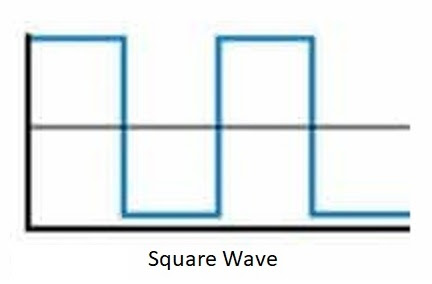
A square wave display, as can be seen this wave form quickly switches between positive and negative and stays positive or negative at full power for longer, this quick switching can overwhelm some electronic appliances connected to the inverter.  


Most small plug in pack chargers and power supplies for cameras, laptops etc these days use switching or switch mode power supplies. So how do we know if this is the case most of the time its in the weight, feel the weight of it and if it feels like it is full of copper wire it more than likely has a conventional transformer in it (most probably needs Sine Wave), if it is much lighter, then it is a switch mode. In theory the switch mode power supplies should work ok on any wave shape input, because they firstly convert the AC to DC, however if the components inside aren’t rated adequately, they may overheat due to the quickly fluctuating square wave shape.

Modified Square Wave Inverter (MSW) A.K.A Modified Sine Wave Inverter (MSW)

Most appliances will work from these basic Inverters, but unfortunately unless you can look at the internal electronic design of the appliance, you can’t be sure if you will really need a Sine Wave Inverter. The squarish wave shape can also confuse the timing circuits in some appliances that use Frequency as a timing control. If the appliance doesn’t work normally or makes unusual noises, then disconnect it or you may have expensive damage. 

These Inverters also generate more interference to TV's, AM and HF radio reception than Sine wave Inverters and can cause buzzing in CD players and stereos. 

When using an inverter in the marine environment tests need to be carried out to make sure the inverters electrical noise isn't enough to compromise reception on VHF frequencies used for radiotelephone, Digital Select Calling,(DSC) and Automatic Identification System (AIS).

Modified Square Wave AKA Modified Sine Wave, as can be seen this wave form is certainly has a lot quicker notchy rise and fall times when compared to the Sine Wave gentle undulation of rise and fall. Also keep in mind the number of additional steps in the modified square wave will influence how the inverter and connected appliances will perform. 

Electric motors for an example in washing machines, bread makers, power tools, microwaves, vacuum cleaners may give trouble if used with a modified square wave inverter. 

Can I run computers with my modified square wave inverter? Most laptop/notebook computer AC power adaptors work perfectly well with the Modified Square Wave Inverter. Desktop computers and some laptops/notebooks may be more sensitive so they may not function correctly or cause a humming noise, in which case a pure sine wave inverter is recommended.

Mac/Apple products are extremely sensitive in the way they use their power, and will require a Pure Sine Wave Inverter to run successfully. We also found a good power filter was also required when using apple products. 

You may have trouble using an AA battery charger with any inverter due to the way the battery chargers draw energy. You will also find that a pure sine wave inverter is a better option for battery chargers due to the fact that there's much less ‘electrical noise’ interference compared to a modified square wave inverter. This ‘electrical noise’ can often wear away at the sensitive components in lower quality battery chargers. The rechargeable batteries, recharging transformer and Inverter may be damaged when trying to recharge devices of 10 volts or higher.

However, it is always a good idea to double check your appliance's manufacturer's guidelines first. If they can't be charged via a modified sine wave inverter, they will mention something similar to "Charge via Mains power only" or not as we have found out.

Sine Wave Inverter (marketed as Pure Sine Wave or Pure Sine or even the S model)

Sine Wave Inverters are more expensive than Modified Square Wave, some times up to twice as much because more components are needed to electronically generate the Sine Wave. You may consider that If the appliance has a Transformer or an Induction Motor think washing machines and appliances listed earlier, then it most probably needs a Sine Wave Inverter to prevent overheating. Now this is not always true, since some fridges and freezers can work fine off Modified Square Wave inverters, and in fact you shouldn't really notice any difference powering a fridge from a Modified Square Wave inverter, however the notchy waveform can interfere with timing circuits.

The wave form output by the an inverter, same shape as the mains power from shore. 

-------------------------------------------------------------------------------------------------


A list of optional features that are listed as inverter options/specifications.

Isolated Input-Output
If you are using only double-insulated appliances (i.e. they have no third Earth-pin on the Mains plug) with your inverter, then it doesn’t matter to the appliance if the inverter has total electrical isolation between the DC input and AC Output (provided there is no fault to earth). In larger installations with an earthed neutral, or if you have earthed appliances such as Washing Machine.  If the Inverter input and output is not isolated, the DC input (battery power 12V) will be up to 115-120 volts AC above the mains earth and this is a very dangerous situation. The out come could be …….. see the next

Electrocution I am lead to believe from years of health and safety briefings it only takes 35 milliAmps (that's 0.035 Amps) in the right conditions to kill a person. The 230 volts from an Inverter can kill you instantly, just like the 230 volt at home, so you need to take precautions. So if you do purchase an inverter that doesn't have total electrical isolation between the DC input and AC output there are several things to do for your safety.

1. Don't use it, return it to the store for a refund, probably the safest but most ignored advice.
2. Make sure the appliance you use doesn’t have an internal connection from earth to neutral.
3. Make sure any appliance is double insulated and does not have a ground pin on the plug.
4. Never make live connections e.g plug in the appliance when the inverter is running.
5. Never disconnect a running appliance with the inverter running.
6. Never work on the batteries or battery connections with the inverter running.

Earth leakage protection or RCD (residual current device)
Bigger Inverters may have these built in, however if not, there are kits available so it can be easily added so operators (consumers i.e. you) are protected by an RCD safety switch and overcurrent circuit breaker. However you cannot get this level of protection unless the inverters input and output are isolated.
A RCD safety switch, while we will never know for sure, we believe it saved us from a nasty accident when our washing machine developed a fault, and another time when I accidently dropped the hand mixer into the sink full of water and with out thinking tried to stop it sinking. 


Earth – Neutral link
An automatic earth to neutral link when on inverter mode (no shore power). When disconnected from shore power the unit makes the earth to neutral connection so RCD safety switches can operate.

This feature is also very important if the inverter is also a battery charger when plugged in to shore power. Most are marketed as combi units to designate an inverter and battery charger combination. When the unit is plugged into mains power the connection from earth to neutral is turned off to make use of the earth to neutral link from the shore power receptacle/power box, this enables the shore RCD safety switch's to work. 

Soft Start
Some loads draw much more current when starting up compared with steady operation e.g. an electric kettle draws a lot more current when first turned on, and motors can also draw very high currents as they come up to operating speed. To reduce these massive current surges, some Inverters bring the output voltage up to full voltage progressively over several seconds. This means you will be able to use an Inverter with a smaller continuous power rating, for a particular load.

Low Voltage Cut Out, Shutdown or Battery Disconnect
To prevent damage to your battery, it’s important that the Inverter can switch itself off and remove all current drain, when the battery voltage drops below a set limit. It helps if the cut off voltage can be set by the user, based on the type of battery. Keep in mind that as battery voltage drops, the inverter will draw more current to keep the output power constant. This means that voltage will drop a lot quicker as it reaches the point of full discharge, therefore manual monitoring of battery voltage is not really practical.

Automatic Fan Cooling
To keep the internal components operating properly the waste heat in inverters must be controlled, it is imperative to have an internal fan that is automatically switched on at a set temperature when needed.

Meters 
You can get by without voltage, current and a frequency meter, but with them it’s easier to check if your system and appliances are healthy, or if you’re close to overloading your Inverter. 

Autostart (may go by different names)
Some larger Inverters automatically can sense when any appliance is connected or switched on, so that the inverter only draws significant power when it’s actually needed. This is particularly useful in larger vessels, caravans or buildings, because you don’t have to switch the Inverter off and on when using appliances.

Not all manufacturers include an Auto start feature especially when it comes to Pure Sine Wave inverters, some have a hard wired remote and the more modern units Bluetooth. The major drawback to this auto start feature is the power used while in standby. This can be significant and should be included in the planned daily power usage.

Remote Control
For inverter installations in vessels, caravans or buildings, it’s handy to control and monitor it remotely, the inverter should be mounted in a cabinet near the batteries to simplify and shorten the wiring necessary to connect the batteries to the inverter. Installing the inverter close to the battery, will allow you to minimise the amount of heavy cabling that is needed in the 12 volt part of the circuit. For operations the remote should also function to alarm fault conditions to the operator.

Inverter/Charger (combi units)
For permanent Installations, the Inverter may be able to charge the batteries when mains or onboard generator is available. These units are sold with a variety of current outputs for the charger, most have the function to connect a remote monitoring panel. Most are advertised as Combi units due to the combination of charger and inverter. They can simplify the connection of shore power due to being an automatic switch between inverter and shore power. No need to clunk over a heavy duty switch to select shore power or inverter. A separate battery charger is no longer necessary.

Some units also switch the Earth Neutral connections so RCD switches work as intended, very important for crew safety.

Overload cut-out
The more sophisticated inverters will protect against over temperature, current, voltage or under-voltage, any of these conditions can cause damage to the inverter or the appliances connected to it.

Overheating of Inverter & Wiring
It’s important not to install Inverters in confined spaces where the heat can’t escape, either through air movement or conduction. It’s very important not to cover the case of the inverter or obstruct any fan intake for example by mounting it too close to a bulkhead or furniture. Never mount an Inverter in the engine compartment, I know some vessels have very large engine bays and I would make sense to mount them in this space. However a separate well ventilated insulated compartment should be constructed to keep the heat of the engine room from entering the well ventilated cabinet.

Twelve volt inverters, can draw high current from the battery banks, the general rule is to divide the output power by 10 to understand how much current will need to be supplied. So a 1000 watt inverter will draw 100 amps from the battery and this means using battery cables which can supply this level of current without overheating, while also keeping total voltage-drop in the positive and earth lead to less than 1.5% in each - i.e. less than 0.2 volts.

Inverter Grounding

I am sure most of us know the high voltage of the AC system presents a shock hazard and can certainly be lethal. The DC system is not normally an electrocution hazard but can provide a lot of current, and so is potentially a source of fire. A suitable ground must be installed between the AC and DC system. During my inverter fitment I noticed in the operating instructions the requirement for grounding connections on both the AC side and DC side of the unit’s case. This grounding can prevent shocks from AC, and fire hazard from DC. 

My previous unit only had the  smaller AC grounding connection made. A fault in the DC side of the system could provide enough current to overheat the AC grounding conductor (think enough heat to melt insulation and start a fire) without blowing the large DC fuse. Keep in mind the fact that the AC ground is not fused and current will flow through the conductor until it burns out. A high amperage capacity DC grounding path back to the DC system should be made. The conductor size for the ground needs to be of sufficient cross sectional area (bigger is better) to be able to sustain enough current to blow the supply fuse.

The installation instructions for older inverters (as I had previously) typically do not include this precaution, but most newly designed units do. Though looking into some different manufactures install instructions this connection is not addressed in any depth, most only state or draw the connection in on the installation schematic. Due to the fuse size in my inverter we needed a 70 mm2 ground wire for the DC ground. 

Limitations

Battery capacity

All the power for the load has to come from the battery, so with high power Inverters or appliances you want to run for a long time, you need large battery banks. If you wanted to run a small Air Conditioner that used 1000 watts on average, it would draw 84 amps, so you need to have a battery bank capable of supplying 2000 amp hours in a day. However we are not done yet, we still need to factor in the losses incurred (the 10-20% mentioned earlier) by running the 12 V DC through the inverter to output 230V AC the figure would be closer to 2400 amp hours draw on the batteries. That means big, heavy and expensive batteries, more importantly a way of recharging them or keeping them charged.

----------------------------------------------------------------------------------

Alternatives to an inverter

Use 12 volt appliances

Many appliances are available as both 12 volt DC or 230 volt AC versions, but the 12 volt version uses less power and is always more expensive. A 12 volt fridge will mostly have thicker insulation and use a more efficient motor/compressor. The designers of mains powered appliances don't factor in the same level of efficiency as they do for 12 volt powered appliances, due to the design spec being for an unlimited mains power source.

A 12 volt electric kettle will use less power because there are no losses in converting the 12 volts to 240 volts first, how ever a lot of people don't actually realise how much power an electric kettle draws and the install of the unit can be more expensive due to power cable size. Using only 12 volt appliances, may reduce your power needs, so you won’t need a generator or run the motor to recharge your batteries on shorter outings. However you need to ensure you use heavy enough cable to run the appliances connected to them. 

Generator

These can easily generate the high power level often needed and they produce a 230 volt output directly. However an inverter is totally silent and much smaller than a generator and doesn't need regular servicing. Keep in mind that most portable generators exhaust can output deadly carbon monoxide gas and in the right conditions this lethal gas can find its way below and slowly kill you while you cook dinner or have a few beers.


Monday, 9 January 2023

13 Deadly Onboard Conditions

 Here is a list of 13 onboard conditions that could be fatal. This may sound rather dramatic.  However some of the danger is easily overlooked and others are not even thought about until they are starting to go wrong.  

Operating power tools in potentially explosive atmospheres 1

Using portable hand tools in explosive atmospheres has the potential to be fatal. Unfortunately there is also a real possibility the resulting explosion and fire could also cause serious damage to the neighboring vessels.

Most portable power tools either battery or mains powered have brush-type motors. The brushes contacting the spinning commutator generate sparks in operation. The internal workings of the tools are cooled by having a fan forcing air through the motor space. In electric drills, routers and saws the air inlet is right where the sparks are created. Vacuum cleaners and cooling fans move a lot of air and in the case of vacuum cleaners most of it is passed through the motor housing.

So what are the dangers: its things like stirring solvent based paint* with an electric drill, cutting or sanding when solvents or thinners are being used in the same space. Using house hold cooling fans to ventilate an area where volatile solvents are in use.** Volatile chemicals used as a cleaner when using sealants, with the solvent evaporating from the work cloths, picking up a drill or sander to do more work may cause a fire or explosion.

Explosions have taken place when a wet/dry vacuum was used to pick up a spill in the bilge. The dust filter offers no protection to volatile chemicals that are free to pass directly into the motor. It doesn’t have to be a fuel spill, things like dewatering fluids give of flammable vapors when evaporating. A wet/dry vacuum is a wonderful way to pick up spills, but it’s also excellent at mixing and igniting explosive vapors.

My personal experience is that a work assistant working alone forgot where he was and picked up a battery operated drill to tighten some screws in a ships back up power battery compartment. Luckily he walked away with only some minor burns. However it was a costly exercise replacing the batteries and carrying out the repairs to the compartment.

** Volatile solvents in the wood preserver painted on can been ignited by the use of cooling fans used for ventilation, it could be fatal if there’s enough oxygen for an explosion. I have even seen a magazine cover photo showing a can of paint being stirred with an electric drill, just shows how easy it is to not recognize the danger. Even in the open air the volatile solvents in the paint can waft up to be drawn into the electric drill and be ignited.

Not having a carbon monoxide detector fitted 2

Carbon monoxide is a poisonous, colourless, odourless and tasteless gas, and is formed when there is not enough oxygen present when carbon-based fuels such as, gas, petrol and fuel oil are burnt. Exposure to carbon monoxide can cause symptoms that include headaches, nausea and even death. While it’s a myth that Carbon monoxide is heavier than air it can still mean that it can fill most of the accommodation area with the poisonous gas displacing the oxygen.

Carbon Monoxide detector makes it easier to sleep in the cabin, don't want to wake up dead from the fumes
I have noticed that running small petrol generators on deck to help keep up with power demand is becoming common place. It doesn’t have to be a small generator it could be a space heater that should be only be used in outdoor areas or it could be a small leak in the exhaust system. There are a multitude of ways carbon monoxide can be produced in sufficient quantity to kill everyone on board or more to the point every one below decks. Using the small generator as an example, if the breeze is right the exhaust gas can be blown down into the accommodation. Over time the carbon monoxide can reach fatal levels that in most cases are not detected until it’s too late.

Fit a good quality carbon monoxide detector along with a good quality smoke detector.

Failure to install a good quality smoke detector 3

Like in a house you could die in your sleep if you fail to wake up in a fire on your vessel. With fire, early detection is the best way to get on top of and perhaps control a fire on board. It could be the difference of getting the additional items required for survival off the vessel into the life raft. Or could give you enough time to actually launch the life raft so you don’t only have enough time to run on deck and jump into the water before the vessel explodes. During a fire on a vessel you literally have precious seconds and you don’t want to waste any of them.

Smoke detector, far enough away from the galley not to cause false alarms 

Not having a fire extinguisher in every space 4

As previously mentioned, during a fire on a vessel you literally have precious seconds. Have a fire extinguisher in every space including the cockpit lockers. The cockpit locker extinguisher can give you a fallback position or you may need to use it to gain access. Make sure there are at least two fire extinguishers and two fire blankets in close reach of the galley. Get the biggest fire extinguishers you can fit on board, the small extinguishers only work for seconds (honestly only seconds). One of the best things you can do for your self is to go to a fire safety day to learn how to use an extinguisher and fire blanket. While most of us think it’s easy to use an extinguisher, when faced with the real deal even in a training situation you need to know how to use them or they won’t put the fire out.
Fire extinguisher and fire blanket, the blanket is in a place adjacent to the galley so I don't have to fight flames to get the blanket. Be careful if you mount a blanket in the galley is it accessible if there is flames coming from the stove top. 

Those of you with Lithium batteries should look at carrying a special type of extinguisher, and know how to use it. These D class extinguishers are for metal fires. You may also require heavy fire rated board under your batteries to protect the hull should a battery catch fire.


Using non-ignition protected devices in an explosive atmosphere 5

Five litres of unleaded petrol carried on board to refuel the dinghy motor turns a diesel boat into a petrol boat. It is dangerous to store outboard unleaded petrol or portable gas stove bottles on board vessels that have not been designed for ignition protection. Petrol for the dinghy motor when carried on board should be in a locker that can vent overboard just like the gas bottle locker.

The portable stove gas bottles should be able to find a home in a small space set aside in the gas bottle locker that is vented overboard.

Petrol vapours being heavier than air will flow down the companionway or open hatches as well as from lockers that are not sealed from the internal space of the boat. These fumes will flow right into the bilge and engine spaces. The starter, alternator, switches, fuses and circuit breakers will more than likely have been selected according to the various rules for a diesel engine vessel in the country of manufacture. Some vessels having undergone refits and or repairs may not have any thought put into the use of ignition protection devices.

So have look around your vessel and see if you can find any sources of ignition. Start in the battery compartment, a place certainly in need of ignition protected circuits. Check the compartment is well ventilated to limit the build up of explosive gases. Then move on to how your solvents and volatile chemicals are stored. Check the gas bottle locker regularly to ensure insects haven’t decided to nest in the vent.

 If on your vessel you see that the electrical cabinet looks like it has vomited a technicolour of wires most likely safe work practices have not been followed. A good clean up of the cabinet would be a good place to start, then move on to the other systems in the vessel electrics. while its hard to see here there is an AC switch in the middle of the DC circuits. AC mixed into the DC isn't going to do any one any good.

Using poor quality fuses and fuses holders 6

If the fuse and or fuse holder have melted (even though the fuse has not blown) it doesn’t necessarily mean the equipment is faulty and drawing too much current.

If the fuse itself has not blown but rather the fuse holder has melted, it indicates that the equipment is not drawing excessive current. It indicates that more than likely the fuse holder was making poor contact with the fuse.

The failing fuse holder, this holder was part of a dual battery charging unit sold by a large marine alternator maker. As can be seen, the holder would have been running at higher current for longer than it was designed for. 

Heating in an electrical circuit is always caused by current flowing through a resistance. If there is significant resistance in the contact between fuse and fuse holder, electrical current less than the rating of the fuse can cause enough heating to melt the fuse holder. The high resistance (and heating) may not happen straight away. When new the initial resistance may be minimal and the heating due to poor contact may not be sufficient enough to melt the fuse holder. However the ongoing heating can cause oxidation of the metal connections which in turn leads to increased contact resistance. Poor contact might also be caused by reduced spring tension on the fuses due to the heat generated in the fuse holder. This accelerates the heating effect until there is an in-rush of quickly increasing heat leading to increasing resistance, in essence a heat / resistance spiral (avalanche). This can lead to what may appear to be a sudden failure of the connected equipment even some time after installation. This sort of thing can happen to any style of fuse and or fuse holder, glass fuses with exposed solder on the end caps or the fuse holder contact is solder can give trouble due to oxidization of the solder.

Fuse on the left has soldered connection. 

The solution is relativity simple; use a good quality fuse and fuse holder. The popular automotive blade type fuses and holders may be OK at lower currents, for example 5-20 Amps. For higher currents over 20 Amps it is necessary to use good quality fuses and fuse holders, and for these higher currents use fuses that screw or bolt in place when you can.


Bolt in fuses can supply better contact and maintain load better


Running circuits continuously at 100% load 7

While some may think there is a correlation with the previous condition this is a separate situation.

Two things that can make it a complex job trying to match circuit protection fuses and circuit breakers to the wire it protects. The first is the current (in Amps) that fuses really blow or circuit breakers trip, because this is usually considerably higher than the ratings marked on the units. Secondly the wire (along with circuit breakers or fuses) can heat up considerably when they carry 100% of their marked ratings for several minutes or more.

As mentioned earlier heating in an electrical circuit is always caused by current flowing through a resistance. Normally a fuse, circuit breaker and wire will add some resistance to the circuit, the more current flowing in the circuit will increase the heat generated. In combination with being bundled together or in a hot cabinet or cable trunk the heat produced in the wires carrying high current can melt the insulation when wires carry 100% of their rated current value.

Heat creation may become a problem when systems run for a considerable time. Large diameter wires take a longer time to heat up, intermittent operations like bow thrusters, anchor winches, and toilet pumps seldom run long enough for this kind of heating to occur.

As an example a 00 gauge wire running fully loaded may take 30 minutes to approach its maximum allowable temperature. In contrast, small diameter wires can reach peak temperature in a few minutes. When systems run continuously for 10 to 30 minutes or more, make sure to choose wire and circuit protection so the current does not exceed 80% of their rating.

As a reference ATO, SEA, Maxi and AGC fuses, and most circuit breakers will blow or trip at about 130% of their rating. High current circuit breakers and ANL fuses blow from 140% to as high as 266% of their rating. Most high current circuit breakers will usually list this fact in the instruction sheet and will list the time it will take to trip while being over loaded. If this is not satisfactory choose high current fuses.


Over loading the AC shore power cord 8


The shore power cable and connection is the most easily overloaded wiring on the boat because it feeds all of the AC systems including receptacle outlet circuits.


Overloaded plug on a shore power cable, should have been a 15 Amp plug at a minimum 
 

Out on the water electrical equipment on most sailing vessels will run quite well on battery power. But possibly the first thing to be connected once tied up at the dock is the shore power. At the end of a weekend away, having just sailed across the bay and motored the last couple of minutes to dock, the batteries will more than likely be in need of a good charge. The hot water system will want to heat up. Then if you want to have a cupper before heading home or settling down for the evening you will probably turn on an electric jug.

So if the above scenario is played out, more than likely the vessel AC circuit capacity has just been exceeded. If you’re not careful it doesn’t take much to overload the shore power connection.

So how does all this work out? Here are the numbers to explain the overload. The usual shore power cord/receptacle is (should be at a minimum) 15 Amps @ 240 Volts AC this equates to 3600 Watts. The power draw of a hot water system element varies but 1800 watts isn’t out of the question. The current a battery charger can draw varies with the amount of current needed to charge the batteries, however if the batteries are run down its possible the charger may require up to 900 watts. So already the usage is up to 2700 Watts, turn on the electric jug and quite quickly the current draw through the shore power lead can be up to near 19 Amps so that’s 4500 Watts, an over load of 900 Watts (25% overload).

On cold or hot days at the dock a lot of cruisers turn on a small electric space heater or air-conditioner while also running the rest of the vessel. Some of these small heaters can draw up to 2400 watts not leaving much overhead, so it’s a necessity to know the load each item can put on the electrical system.

Get to know the current draw in watts of your appliances usually written on the back, and with some quick math’s you can keep your usage to a safe limit. The result of an overload can be a short circuit and quite possibly a fire.


Inappropriate shore power cord usage and care 9

The shore power cord can easily be mistreated, take a walk down the dock and you are most likely to see the humble shore power cord undergoing all sorts of cruel treatment. The torture may include things like dunking, keelhauling, sun bleaching, and being stretched to name a few.

Something that needs mention is the habit of coiling the excess power cord and leaving it in a pile. Have you ever looked at the writing stamped on the outside of the power cord and wondered why it is necessary, and have you often thought it’s never that hot and the cord will be fine. Well if the coiled cord is used to maximum or near maximum current draw it will heat up due to the resistance in the wire. Due to the shape of the stack the heat cannot escape from the center of the stacked coil. The flow on effect is the possibility of a short circuit and fire when the insulation begins to exceed safe working temperature, melt and fail. Rather than leaving a coil, lay the excess along the finger to let the cord breathe and dissipate the heat. The same can be said for cord stored on a reel, unreel the cord before use, again the reason is to let the cord breathe and stay within safe working temperatures.

Use the shore power cord locking ring and perhaps a short lanyard on the vessel end to take the strain off the power plug to maintain a solid connection between the power cord plug and hull receptacle. The locking ring stops the plug from backing out and keeps the two components together so that the connection is not moved by normal motions. The constant movement of the connection between shore power cord plug and socket due to the boat's motion can loosen the connection.

I have also noticed there is an aversion to the use of the strain relief when connecting to the utility post or at the vessel side. Once plugged into the power use the four finger spike or cord clip on the utilities pillar to take the strain off the plug. If strain relief isn’t used and the cord is then left to hang from the power socket. Gravity and any small motion can cause the plug to wiggle back and forth in the receptacle compromising the electrical connection resulting in dangerous heating. This can damage both the plug and socket, if the socket is over heated the socket spring contact tension is compromised and it will forever be a problem.

Keep the shore power cord out of the water, over a period of time in water the insulation can harden and water can wick into the cord through microscopic holes in the insulation. Once water finds its way into the cord there is no repair, it is a throw away. The same can be said for cords that are stretched, again there is no repair.

Make sure the power cord is not subjected to abrasive wear on the dock, this is not always easy with concrete docks and the movement of the vessel. Place the cord out of the way of foot traffic and if it needs to cross a walkway look at getting a cable mat to protect the cable and minimize the trip hazard for passing pedestrian traffic. Really if you need to get to the other side of the arm to plug into the utilities pillar you should bring up the safety issue with the marina operator. You’re paying for the power so there should be a safe way to access the outlet from your side of the arm/finger. This is a real safety concern, what are some of the risks? It could be anything from grazed knees, sprains, broken bones right up to loss of life if someone trips over the cord and bangs their head as they slip into the water.

Safely handle the cord and ensure the power is turned off and the cord is disconnected from the utilities pillar before handling in case there is damage, no sense in finding out the hard way a conductor has pierced the insulation jacket and the RCD (ground fault detector) doesn’t work. Always inspect the plug pins and the sockets on the cord before use, look for burning and corrosion. Look at the sockets on the utility pillar before use, again look for heat damage and any moisture damage and corrosion.

Cheap 10 Amp house extension cords have no place out on the dock for connecting shore power to vessels. They are not up to the job and are a hazard for everyone in the marina.


Failed AC shore power ground 10

A good way to check for ground wire integrity is to connect the shore power cord to the boat and bring the shore plug into a position near the electrical panel. With all on-board AC sources isolated (eg inverter & generator off), use an Ohm meter to check that the ground (Earth) pin is solidly connected to the vessels ground. You can also check the ground at each receptacle by taking the shore power cord end and meter to test at each receptacle. The reading will vary with the length of the shore power cord and whether the system has a galvanic isolator installed. If your Australian registered vessel has a galvanic isolator installed you may want to confirm the legal requirements and Australian Standards with a qualified marine electrician about having one of these fitted.

While we don’t see them in use very often in a domestic dwelling, I know some people use these cheap (starting at $10) plug in AC receptacle testers aboard recreational vessels. How do they work, well it will all depend on the brand. These units will test for things like reversed polarity (active and neutral) or totally mis-wired plugs (think ground and active reversed). In the old days they relied on small neon’s to indicate an assortment of wiring errors. Now days its LEDs, but the tests are the same, the displayed results are slightly different due to the relatively low cost of LEDs. The problem for boat owners as I see it stems from the plug-in AC receptacle testers being so sensitive that they will indicate a good ground (Earth) even if the only connection is through a prop shaft or thru-hull fitting to water. So the moral of this story is to make sure you test or get someone like a marine electrician who knows what they are doing to test your vessels AC ground (Earth), and with tools not likely to give false positive results.

Not the best sort of tester to give you a real answer to fault conditions. Australian plug.


Fault tester for US style recepticals.


Note: I do know of one receptacle tester on the market in Australia that cannot test if the neutral and ground are transposed.

Incorrectly sized wire 11

There are several problems that occur when sizing wire for a boat’s electrical system.

It has taken me a while to understand why chandleries and some wire supply businesses in Australia advertise wire size by the overall outside diameter of the insulation. As it turns out it’s a system used in the automotive electrical trade, and specifies cables by the outside diameter of the insulation. Not sure who thought this one up but it doesn’t make a great deal of sense.

Good quality marine cable, wire size and temperature rating stamped on the jacket

Peculiarly, there doesn’t seem to be specifications of what the dimensions of the insulation and conductor sizes should be. So as you can see this can result in wide variations in the cross sectional conductor area and in effect the current carrying capacity of cables from different suppliers that are specified to be of the same diameter. Since copper is worth more money than plastic most of the time the copper wire cross sectional conductor area and with it the current carrying capacity is reduced. A bit like what happens with chocolate bars, the price remains the same but the bar size shrinks over time.

The reality is you may end up with a lot of insulation and less conductor. So here is the problem, since the cross sectional conductor area of the cable is not usually listed it really requires more investigation to ensure the wire to be purchased is of adequate cross sectional conductor area for the job. Determine what the cross sectional conductor size of the cable is before using it. The metric way of listing the copper conductor size will be in mm², as an example 6 mm² is equivalent to 10 AWG.

How long is a piece of string? Using this principal (chandleries) businesses selling wire do not help when they start specifying current carrying capacity of certain wire sizes. This is all done with scant regard for the length of the wire in the circuit. The longer the wire in the circuit the more resistance there will be in the circuit. So a wire sized to be capable of carrying 10 Amps to a piece of equipment in a one metre circuit, will not deliver enough voltage to the connected equipment if the wire run was ten metres. If the cable run is increased by just a couple of metres the side effect of a cable running over loaded is that if the circuit was put into service for some time damage to the insulation will start to occur. Equipment running on undersized wire will also be in danger of not being supplied the correct voltage. Some equipment will not work to specification and some will suffer unrepairable damage. Be wary of this one size fits all approach to selling/buying wires and cable.

A simple rule for wires is that the thicker they are, the easier the current can pass through them, in other words, the less resistance they will offer, and thus the less voltage drop will result.

In Australia boat cable sold as 4mm cable has a cross sectional area of 1.84 mm² and 6mm has a cross sectional area 4.59 mm² (mm² = mm squared) makes it easy for a mistake doesn’t it?


Missing or faulty RCD circuit breaker 12

A residual current device (RCD), electrical safety switch or even known as ground fault switch, protects us from the most frequent cause of electrocution - a shock from electricity passing through the body to the earth. Yes the residual current device or RCD for short can be a life saver. Most of us have probably had an occurrence where with out one we may not be here. I know myself I had just finished filling the sink with salt water so I could rinse off the dishes. Then some how I knocked the still connected electric hand mixer into the sink and in the effort of trying to save the mixer my hand and the mixer ended up in the sink full of salt water together. The good thing was I didn’t feel a thing because the RCD did its job and tripped off the power.

RCD switch, a vessel should have (depending on wiring) two, one to protect input from the shore power then the second to protect from the output of the inverter. 

The average cruising vessel can more than likely be totally protected with just two units. One on the incoming shore power supply and a second one fitted on the outboard side of the inverter and or generator before the main electrical cabinet circuit breaker. The only thing to be aware of here is how the out put of your inverter is configured to run, RCD’s will not work on all inverters. Now may be the time to get professional advice.

RCD’s should be tested frequently, especially in areas subject to lightning or if there has been any electrical malfunction onboard. Because of the harsh atmosphere in the marine environment, these devices may have a shorter life span on a boat than they have ashore. Another hazard to be aware of on a vessel is that these units are not likely to be ignition protected and this will need to be taken into consideration when having these units fitted.


Absent inverter DC grounding 13

Inverters are connections between a boat's AC and DC power systems. I am sure most of us know the high voltage of the AC system presents a shock hazard and can certainly be lethal. The DC system is not normally an electrocution hazard but can provide a lot of current, and so is potentially a source of fire. A suitable ground must be installed between the AC and DC system. I recently had a new inverter fitted and noticed in the operating instructions the requirement for grounding connections on both the AC side and DC side of the unit’s case. This grounding can prevent shocks from AC, and fire hazard from DC.

My previous unit only had the AC grounding connection made. A fault in the DC side of the system could provide enough current to overheat the AC grounding conductor (think enough heat to melt insulation and start a fire) without blowing the large DC fuse. Keep in mind the fact that the AC ground is not fused and current will flow through the conductor until it burns out. A high amperage capacity DC grounding path back to the DC system should be made. The conductor size for the ground needs to be of sufficient cross sectional area (bigger is better) to be able to sustain enough current to blow the supply fuse.

Cross section of cables bigger is better 70 and 35mm2 shown the 70mm2 is used for inverter DC ground

The installation instructions for older inverters (as I had previously) typically do not include this precaution, but most newly designed units do. Though looking into some different manufactures install instructions this connection is not addressed in any depth, most only state or draw the connection in on the installation schematic. Due to the fuse size in my inverter we needed a 70 mm2 ground wire for the DC ground.


Fuse Problem

While this problem isn't seen as much as it used to be its still worth while knowing about. The out come is the possibility of permanently damaged or intermittently malfunctioning equipment. 

We had trouble with glass fuses in those inline fuse holders, the ones we had trouble with are the glass body fuse with chrome end caps that has the fuse wire material soldered in place. The solder on the end caps of the fuse when used in some inline fuse holders that also use a soldered area or spring for connection can cause high resistance between the contacts very quickly. The lead/tin in solder appears to oxidize reasonably quickly. The flow on problem is that it can cause the failure of the attached equipment due to it not being supplied with the correct voltage and current.

Glass body fuse, the one on the left has the fuse material soldered in place, the fuse carrier on the right is preferred

To check, open the fuse holder, if it does not grip the fuse around the end cap but relies on pressure on the ends, be aware to make sure the fuse holder contact area does not have soldered ends, the ends should be smooth and shiny, preferably with the fuse size stamped on.

Another problem we have experienced is that the small contact area and lack of spring pressure of some fuse holders can cause excessive heat and failure of the fuse holder. A lot of the cigarette lighter type appliance plugs are being made to a price and while they are stamped as being capable of sustaining 10 amp however they come with a 2 amp fuse. In all our experiences using the plug at higher current (>2 Amps) by replacing the fuse with a larger fuse will ultimately see the quick failure of the plug due to internal contact failure, poor contact gives rise to resistance and under load this resistance causes excessive heat, the higher the load the more heat generated, the body of the plug then starts to melt and before you know it, you smell smoke at about the same time the appliance connected via the plug fails. Unfortunately the only real way around this is to purchase the high end, brand name plugs.

In the photo the end cap that is not soldered can be identified by the fuse size stamp on the cap end.

Saturday, 24 November 2018

Setting up our Raspberry Pi with OpenPlotter


What we did to install OpenPlotter on a Raspberry Pi to have a OpenCPN chart plotter running. 


A quick note about the Raspberry PI. Top of the list is the latest model of RPI (Raspberry Pi) and that is the Raspberry Pi 3 Model B+, there are still B models out there for sale but I spent the extra couple of dollars and purchased the newer B+ unit. No sense starting off with an older/obsolete model.

Shop around, we saw B models costing more than the later B+ version. If possible see if there is a package deal. We purchased a package and it turned out to be a good deal after adding together the cost of the individual items. About the only thing we didn’t need was the AC power adapter that came in the package.  We just put that away into a locker as we very rarely use AC power once away from the dock, and we certainly wont be using AC to run a chart plotter.

Raspberry Pi box almost the same size as the mini mouse. As you can see from the box the model B+ is well marked.

For power we use a 3 amp DC-DC USB charger that plugs into a 12 volt cigarette lighter socket. We tracked down a heavy duty USB charge cable with micro connector to run the RPI. It took a little time to track down the 3 Amp output DC-DC USB charger. As usual there are traps for the uninitiated.  Before handing over your hard earned cash make sure the output of the power unit will supply 3 Amps to a single USB socket, there are some rated as 3 Amp but only supply 1 Amp to each of 3 sockets, or for 2 socket units, 2.1 Amps to one socket and .9 Amps to the other.

After booting up and running the unit, if you happen to see a small icon in the shape of a yellow lightning bolt in the top right hand of you screen your power supply likely isn’t supplying enough power (amps). Or perhaps the cable you have isn’t sufficiently heavy enough. When purchasing a power cord look for cords aimed at being designed for tablet charging, these are marked as being good for 3 amps continuous.

The RPI 3 B+ does have built in Wi-Fi on board. However to get the most out of the installation we also purchased a Wi-Fi USB Dongle. Why you may ask? To have 2 Wi-Fi units running on the OpenPlotter RPI. On board Matilda we have a 4G Huawei mobile Wi-Fi E5577 router which connects to the internet (that is when we are in range of the cell phone towers). The Wi-Fi USB Dongle plugged into the OpenPlotter RPI allows it to connect to the E5577 router (as a Client) so we (OpenPlotter RPI) have an internet connection. Of course you could hotspot your phone and connect to the internet that way. The built in Wi-Fi on board the RPI is then available as an access point (AP) so other computers, tablets and smart phones can log on to the OpenPlotter RPI (as clients). If you don't want to purchase the second WiFi dongle you could USB tether your phone. The main reason to get the RPI on line first up is to update the operating system and OpenPlotter software. After the initial update the internet connection is nice so you can get GRIB files and tide data from the internet.
E5577  4G Huawei mobile Wi-Fi  router

You will need at least these items and this is what we used to run the software.

Monitor option
    1 x Raspberry Pi 3 Model B+ (Prices start at AU$60)
    1 x 16GB or larger Micro SDXC card, ours was a 128GB  (A class 10 or better  100MB per second)
    1 x 5V 3A, Power Supply Adapter, we are using a cig lighter socket 3 amp USB tablet charging unit
    1 x Heat Sink Set (3 piece pack get the better quality copper heat sinks)
    1 x Casing with Fan
    1 x 1.5 Meter HDMI Cable (or length you need, short is better)

The monitor we are using is the vessels 12V LED TV which has 2 HDMI input ports.
Logitech MK240 Nano Wireless Keyboard and Mouse Combo
Wireless adapter (150Mbps WiFi USB Dongle)

Any laptop or desktop computer for the initial prep work, I have numbered the summary to match the work list.
Most of the bits we used, Keyboard and Mouse, Raspberry Pi board, heat sinks, SD Card, HDMI cable and WiFi dongle, not in the photo is a case and the 12V 3 amp USB charger. 

Summary
1. Get the software, NOOBS (New Out Of Box Software)
2. Format the micro SD card for use in the RPI (Raspberry Pi)
3. Extract the files from the NOOBS download on to the PC
4. Load the NOOBS software on the SD card
5. Get ready for the initial boot

1. Download the latest NOOBS installer version of OpenPlotter RPI, on to your PC. It’s a compressed 1GB file so it may take a while. The file is available here:
http://www.sailoog.com/blog-categories/openplotter-rpi/


Screen shot of the OpenPlotter download page, we downloaded the NOOBS

NOOBS zip file downloaded, the directory NOOBS_v2_8_1 is where the contents has been extracted to.

2. If you have a SD card 32GB and under visit the SD Association’s website and download SD Card Formatter 4.0 for either Windows or Mac. https://www.sdcard.org/downloads/formatter_4/index.html/

Screen Shot of the SD associations SD card formatter

Or if you have a Micro SD Card over 32GB like we did with our 128GB SD card, follow the instructions at https://www.raspberrypi.org/documentation/installation/sdxc_formatting.md/

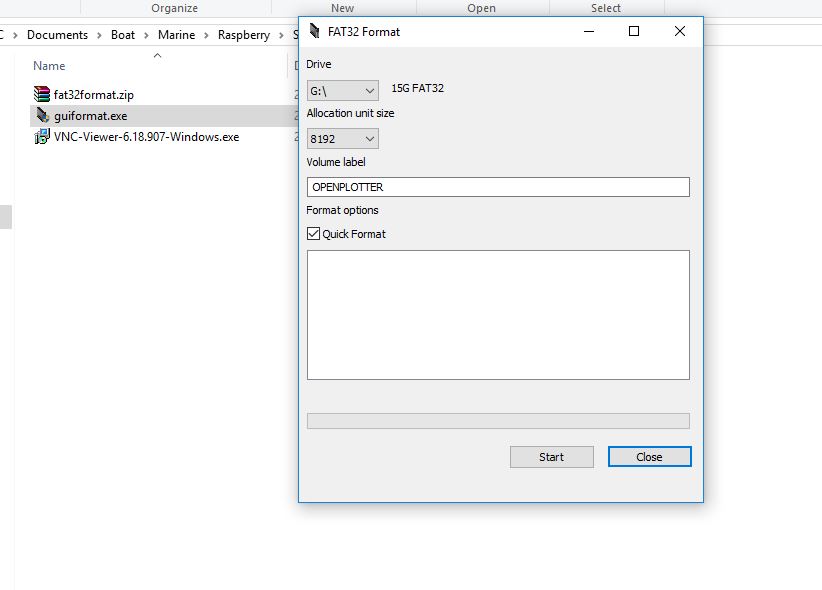
Software to format a SD card of more than 32GB running on a Windows is here. http://www.ridgecrop.demon.co.uk/index.htm?guiformat.htm/

Screen shot of the guiformat FAT32 SD card formatter from Ridgecrop


For Windows (32GB cards and under)
      i. Download the SD Formatting Tool
      ii. Install and run the Formatting Tool on your machine
      iii. Check that the SD card you inserted matches the one selected by the Tool
      iv. Click the "Format" button

For a Mac (32GB cards and under)
      i. Download the SD Association's Formatting Tool   
      ii. Install and run the Formatting Tool on your machine
      iii. Select "Overwrite Format"
      iv. Check that the SD card you inserted matches the one selected by the Tool
      v. Click the "Format" button

For Linux
      i. Its recommend to use gparted (or the command line version parted)
      ii. Format the entire disk as FAT32

Once the initial prep work is done on the SD Card and you have downloaded the NOOBS zip file.

3. Extract the files in the NOOBS zip file into a directory on your PC.

Contents of the extracted NOOBS zip file
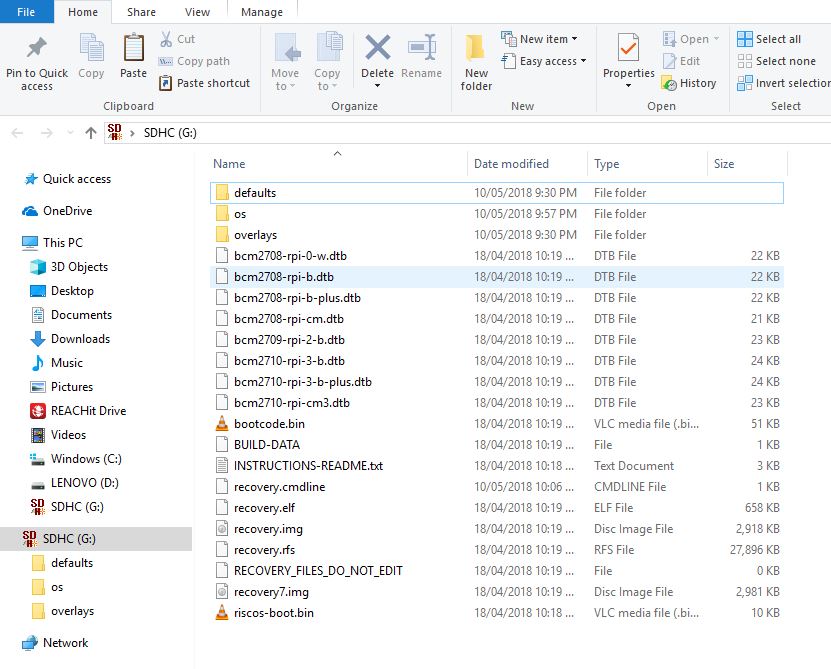
4. Copy the extracted files onto the SD card that you just formatted so that this file is in the root directory of the SD card. Please note that the files have been extracted into a folder. Open the folder and copy across the files from inside the folder into the root of the SD card rather than copy over the folder itself.


For those not accustomed to the term root directory, as an example the files would look like the screen capture. Showing the folders and files copied on to the SD card G:\

5. Fit the heat sinks as per the attached diagrams.

Heat sink placement is straight forward, peel the backing of the adhesive and apply in the place as marked above

Heat sink placement is straight forward, peel the backing of the adhesive and apply in the places as marked above

Insert the SD card into your RPI, attach the HDMI cable, and insert the Keyboard and Wi-Fi dongle into the USB ports, now connect the micro USB power supply cable and plug it into the power.

Left to right, SD card in, power cord connected, WiFi, Keyboard and Mouse dongles in the USB slots

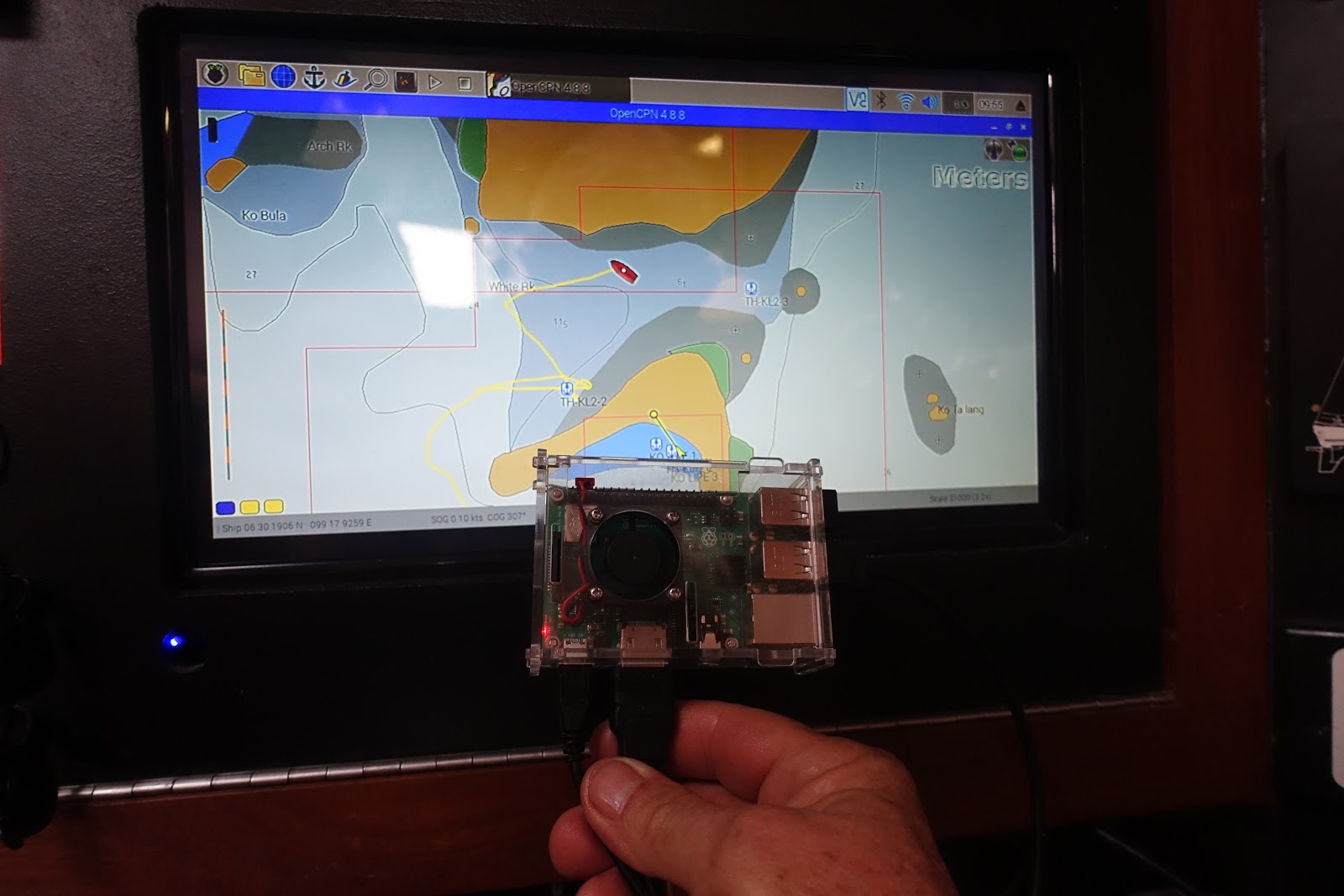
Raspberry Pi is installed into its case ready to go


After applying power your Pi will now boot into NOOBS


First boot screen, software is being installed on the SD card.

The screen after the install OpenPlotter is all set to go

 Now is the time to set up the network, change the passwords for the system and network. Then it will be time to add the GPS data dongle or data cable.

Documentation  from the OpenPlotter web site will help guide you through the set up process. https://docs.sailoog.com/openplotter-v1-x-x/

OpenPlotter Network Configuration Page

We are running OpenPlotter on a RPI B+ so we pick RPI3+ from the drop down menu, we can also connect with a network cable so the bridge eth0 is also selected. The picture shows our setup with network dongle (Client), cable connectivity(bridge eth0) and the RPI running as an Access Point (AP). Change the password here or forever be reminded during boot up you need a new password.


Before configuration of the network, hover over the network connection arrows, only onboard WiFi active , (this could also mean the 4G Huawei mobile Wi-Fi E5577 router is not on)

Top right: Network configured the network arrows have been replaced with the WiFi symbol. Both onboard (AP) and WiFi dongle (Client) are working.

Serial connection page

Added the serial data input, we have AIS and a GPS both running at 38400 baud. The setup is easy with the system selecting the correct port and data rate, plug in a cable and press auto, once correct you will be asked to press apply to save. 


USB To RS485 USB-485 Converter Adapter


We purchased Arduino brand USB To RS485 USB-485 Converter Adapter to connect our serial data. Our data is differential NMEA0183.   Ours were purchased on Lazada as we are in Malaysia, but a quick search on Ebay (USB To RS485 USB-485 Converter Adapter) turns up lots of them starting at about $2.99 each plus postage. Warning the polarity marked on the board connectors is wrong. connect the A+ wire to B- terminal and the B- wire to A+ terminal. It only took me about 6 hours to sort this one out. I see these units are for sale all over the web and I think most of them are coming from the same supplier

OpenCPN running on the RPI as part of the OpenPlotter Package

Using the remote desktop on the phone or tablet over the WiFi access to the chartplotter/Openplotter functions is available anywhere on the vessel.
VNC server is part of the OpenPlotter package and is used to run the remote desktop. To get the OpenPlotter desk top on the remote device download the VNC app from here: https://www.realvnc.com/en/connect/download/viewer/ the app store or iTunes.

Helpful links
OpenPlotter Web Site, the list of  features are not active links, this had me confused first visit. Scroll to the bottom of the page for links to documentation, donations, support, shop. 
http://www.sailoog.com/openplotter

Documentation  from the OpenPlotter web site.
https://docs.sailoog.com/openplotter-v1-x-x/

Support web site, sign up to view diagrams and pictures.
http://forum.openmarine.net/

This concludes our install and initial startup. Follow our journey as we set up layers, add charts, instruments, GPS and  some very cool sensors.

We set up the Tide function with tcdata files that have world wide tide stations in OpenCPN here

Transferring files from your PC to OpenPlotter is very quick  and easy here is how we do it here

Setting up the layers directory so OpenCPN doesn't get bogged down with lots of routes tracks and waypoints here

Initial testing of the fresh install, GPS and AIS connected, comparison with our trusty laptop. Looking very good.